


Redesigning Vancouver’s carbon reporting system resulted in cutting support cost by 65%
Overview
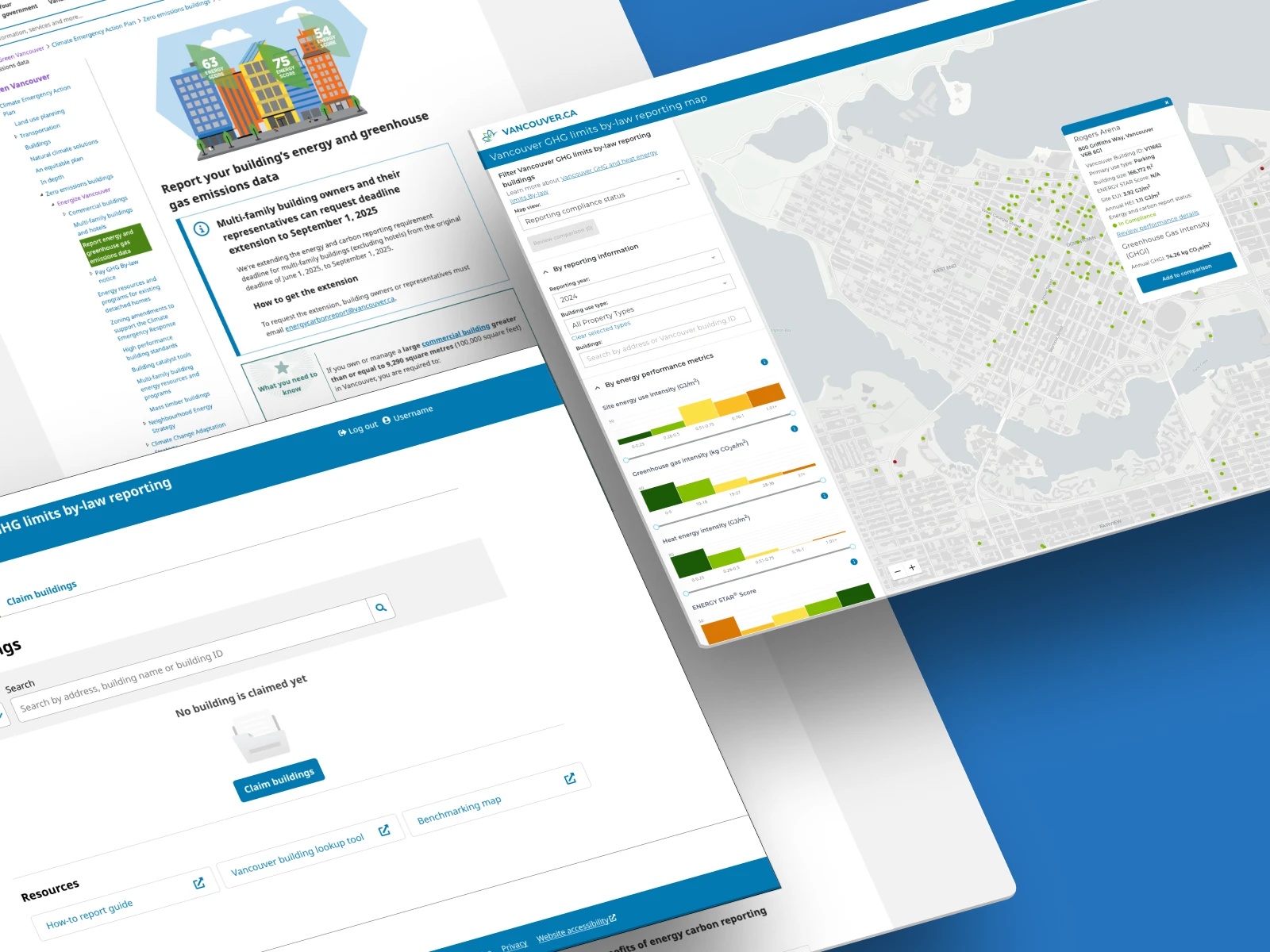
New regulation introduced to building owners: Energize Vancouver. A part of the city's sustainability regulations to reduce the carbon pollution.
My role
- Lead UX Strategist
- Researcher
Teams
- Project manager
- Content strategist
- Third-party developers
- SME
Timeline
Nov 2023 - Feb 2024
(4 months)
Background
A sustainability regulation to keep the city greener and healthier by regulating carbon emission. Building owners are asked to report their carbon emission through online.

The business goal
A 90% compliance rate by the initial deadline.

The design goal
Make this complex green building regulation reporting process accessible for building owners.
circle
Outcomes
What impact did we make ?
📈
94%
Compliance rate by the initial deadline
⏱
65%
support cost reduction
🥇
1st
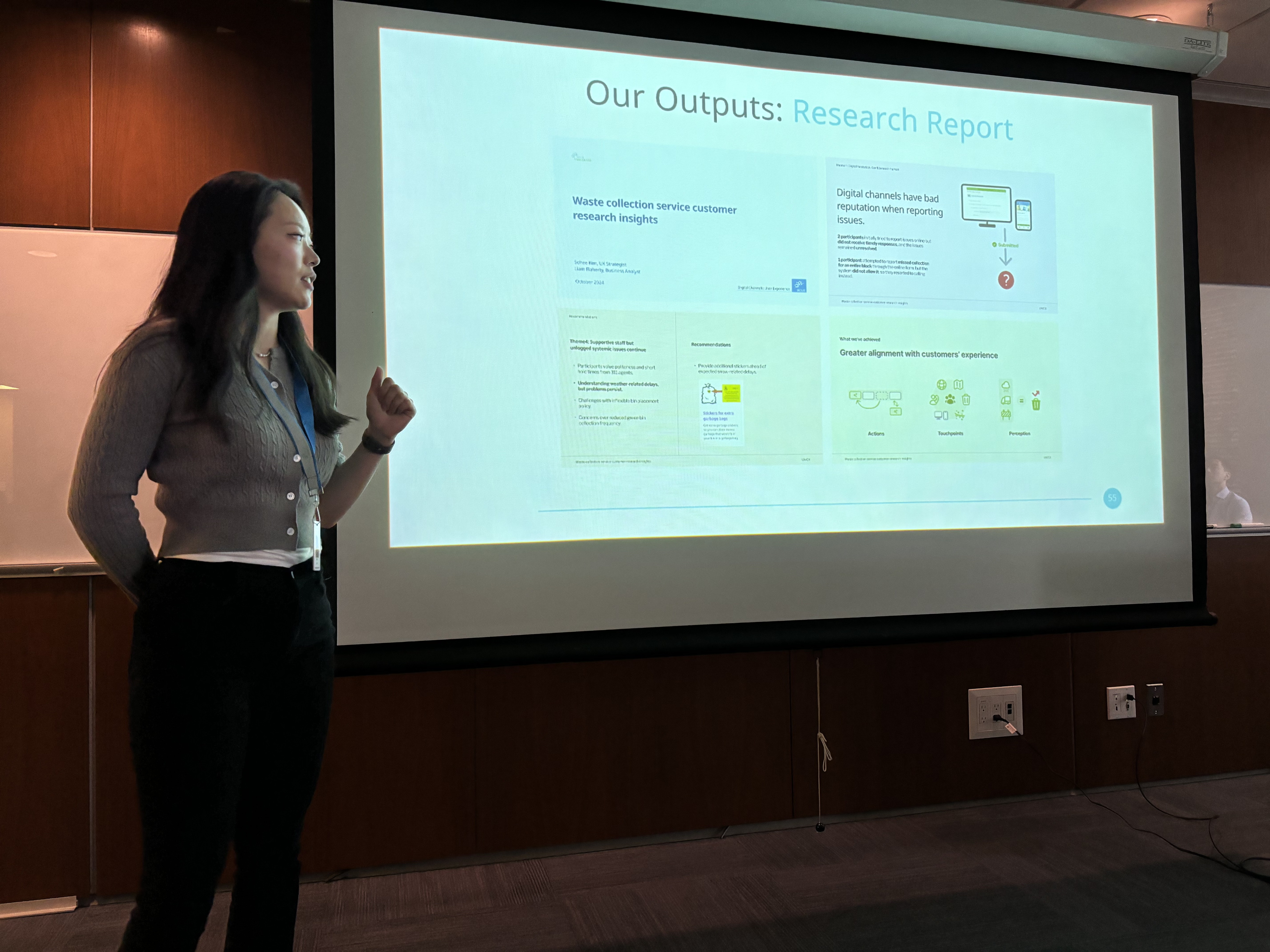
The first in-house research done, set a new user-centric framework
🥇
1st
The first in-house research done, set a new user-centric framework and present it in the digital dept

We decided to improve the city’s reporting process ,
here is why:
quote-left
Background
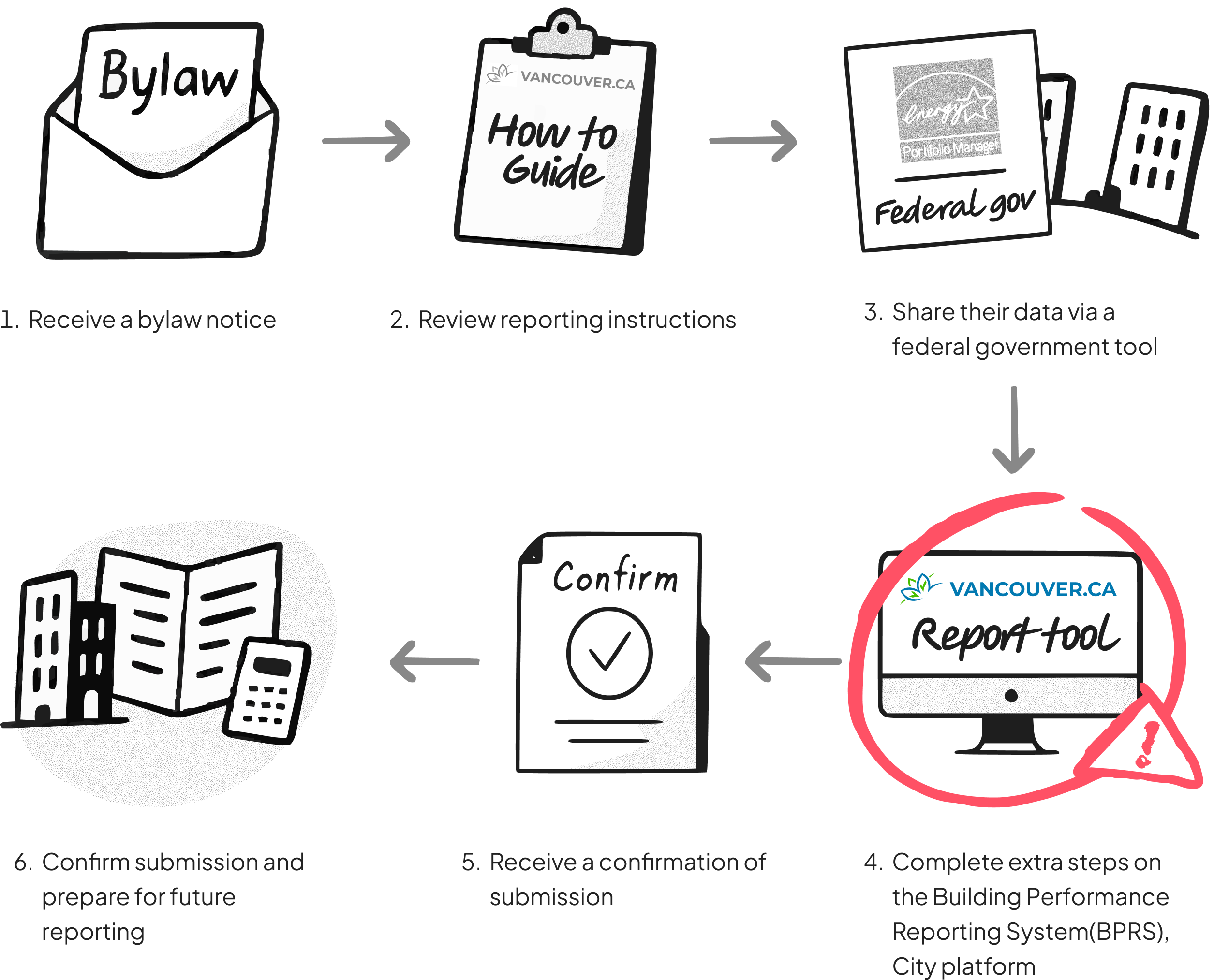
6 steps are involved in the new regulation of carbon emission report
We expected that if the high volume of support calls persists, it will result in a more significant cost impact in the future
~ 212

~ 1,527
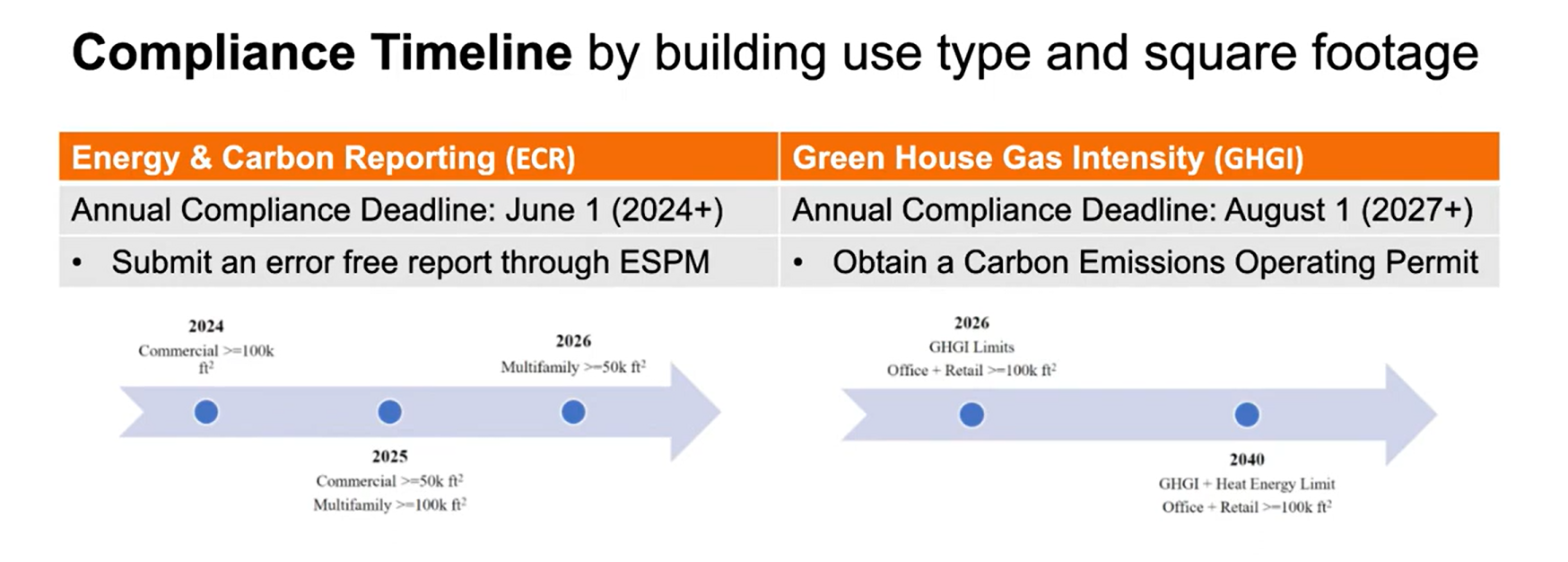

x 7.6 times

The approach
Then we chose the right research to identify what apects about
We conducted and utilized:
- Contextual inquiries (Qualitative)
- Heuristic evaluation (Expert analysis)
- CX data (Quantitative metric)
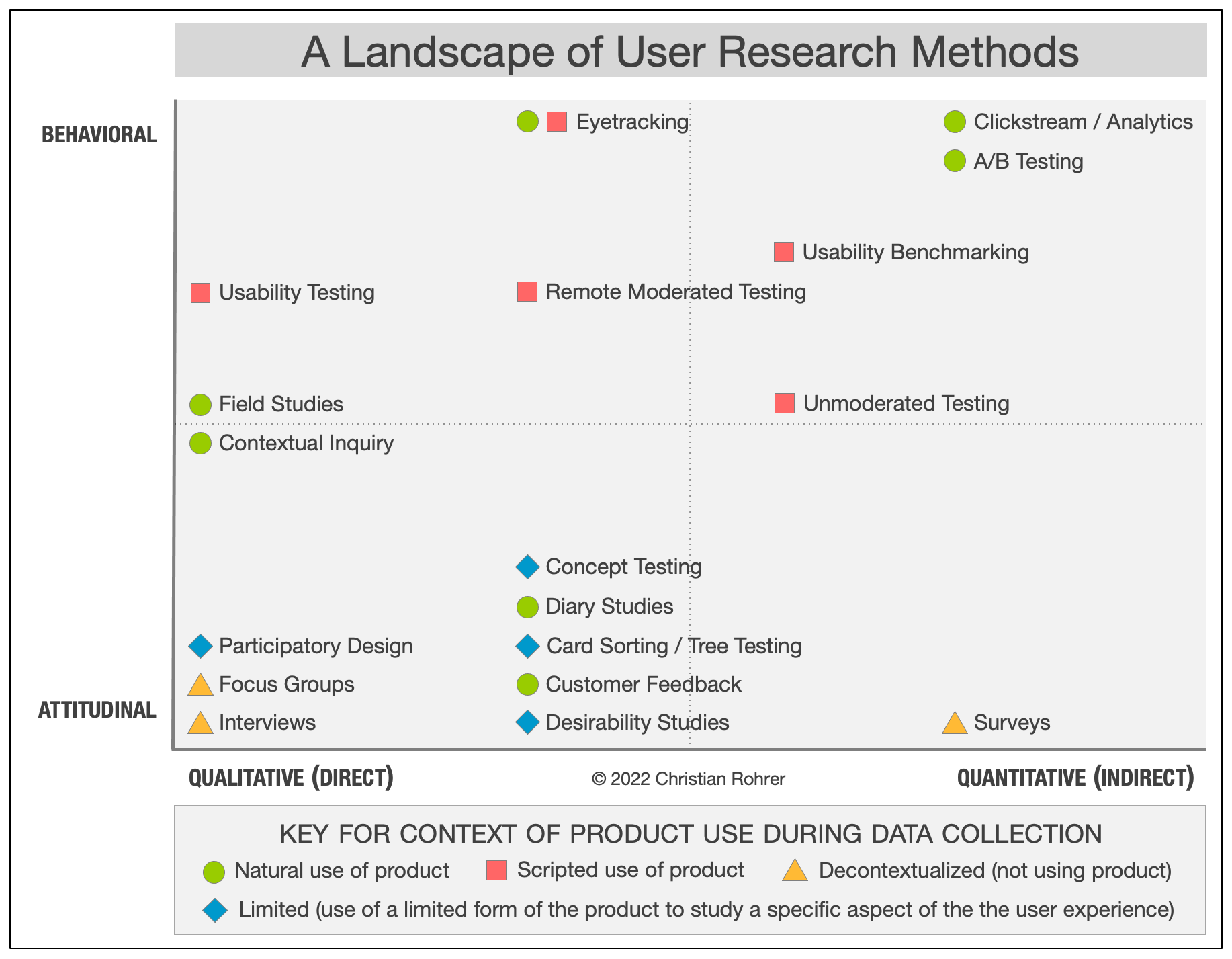
Then we chose the right research to identify what apects about
Engaged with 5 users across various roles and expertise levels.
- 3 users were experts, well-versed in their domains and familiar with similar tools.
- 2 users were novices, lacking industry knowledge and experience with these tools.
One-on-one moderated sessions remotely, lasting an hour per session. Observed their workflows and noted moments of hesitation.


Expert
ESRG Program
coordinator

Expert
Building energy system initiative

Expert
Director of energy and commissioning

Novice
Energy analyst

Novice
Administrative
support
The insight
I uncovered 3 incorrect assumptions from
contextual inquiries & CX data

User groups

Guidance
Expertise level
Building owners delegate the task to third-party consultants. These consultants manage multiple properties and are the true primary users of the platform. They don’t have same levels of data access and familiarities to building owners.
72% of users are third party consultants, not building owners
Building owners delegate the task to third-party consultants. These consultants manage multiple properties and are the true primary users of the platform. They don’t have same levels of data access and familiarities to building owners.
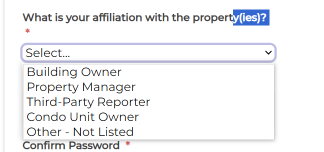
One of the step in registration on BPRS
They are dealing with multiple buildings and have little access to the building data
Building owners delegate the task to third-party consultants. These consultants manage multiple properties and are the true primary users of the platform. They don’t have same levels of data access and familiarities to building owners.
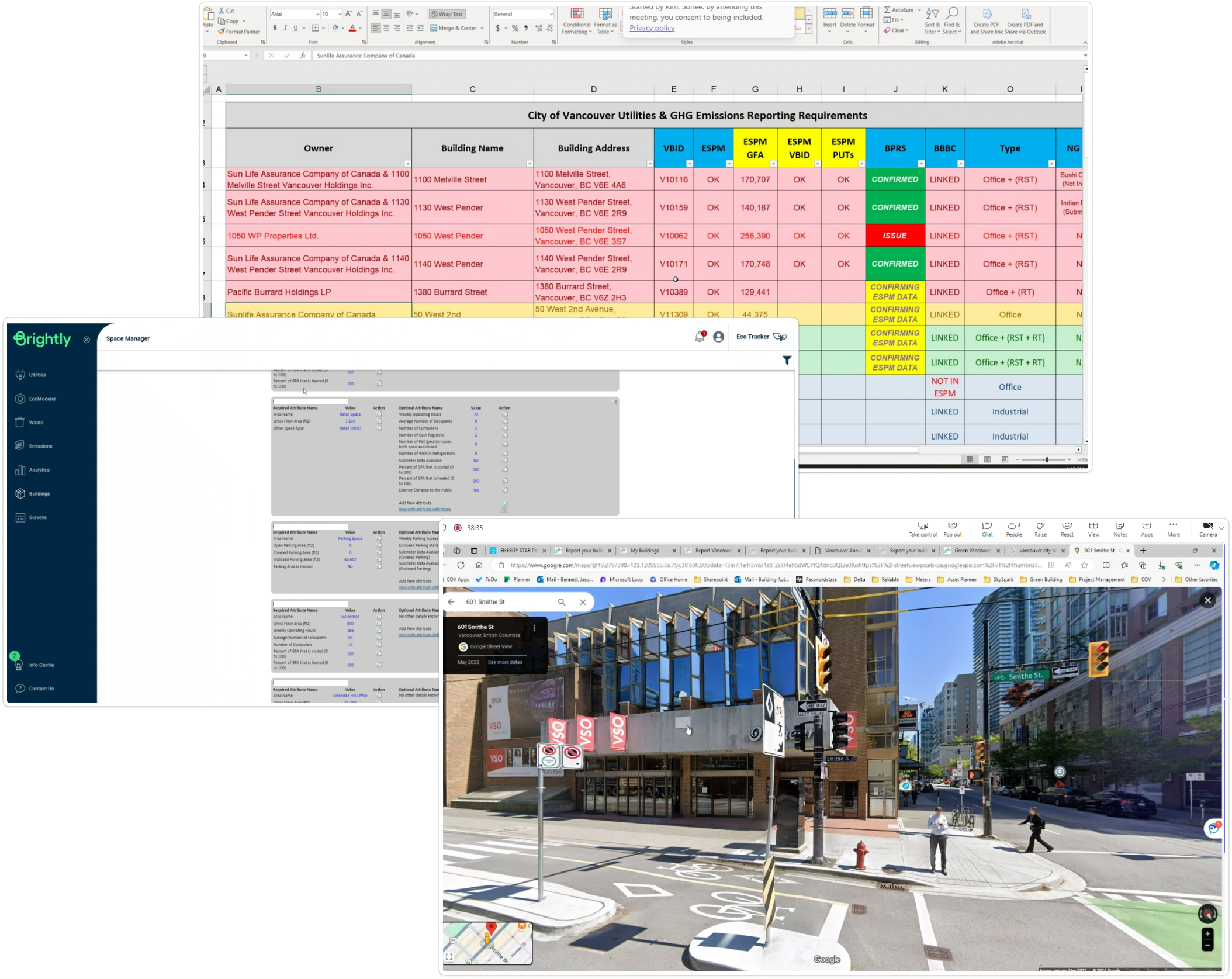
External resources (e.g., old architectural drawings, building data spreadsheets
made themselves, Google Maps, Brightly)
- User groups
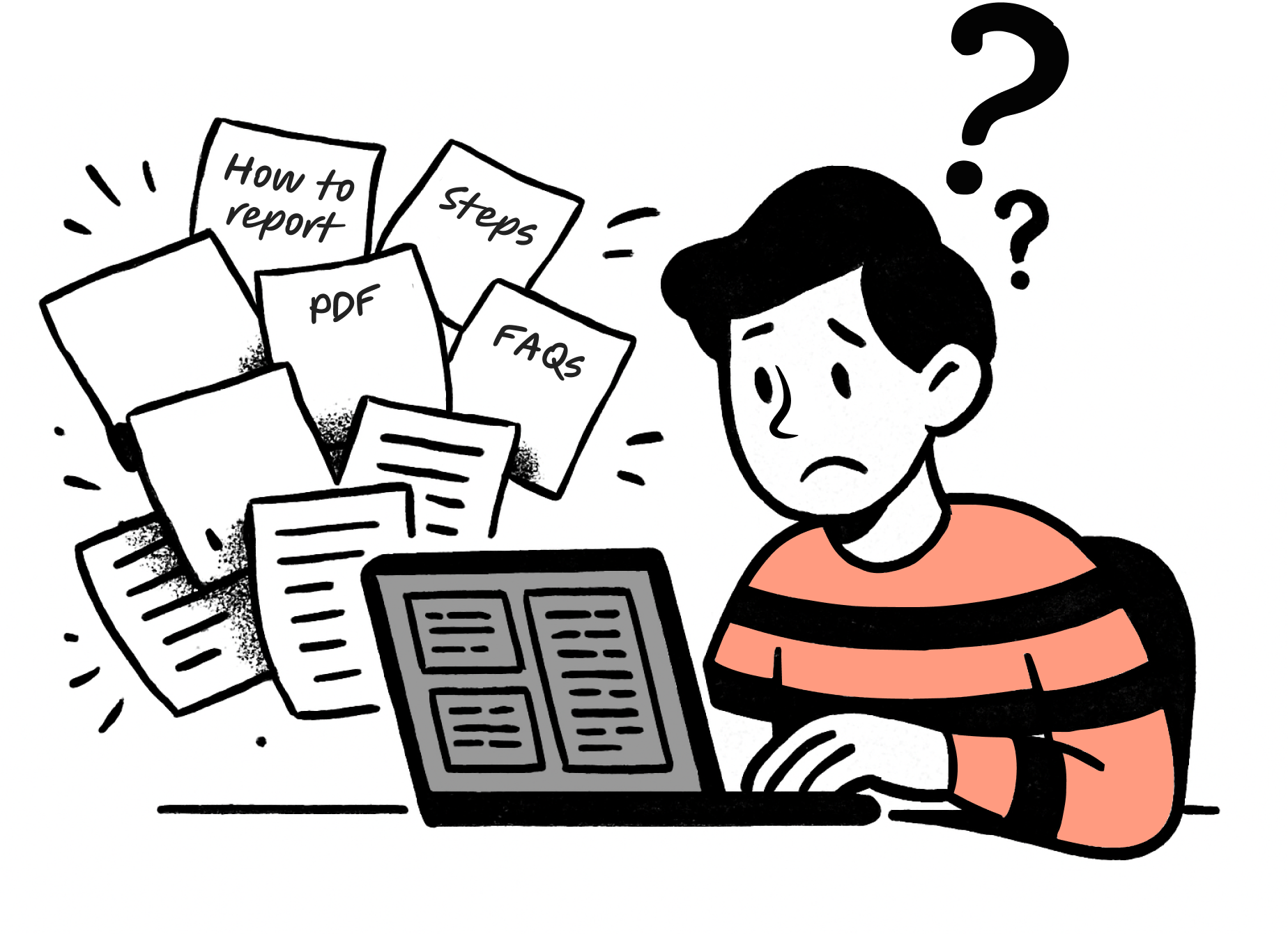
Static instructions, website, PDFs and FAQs, didn’t help users move forward, but overwhelmed users
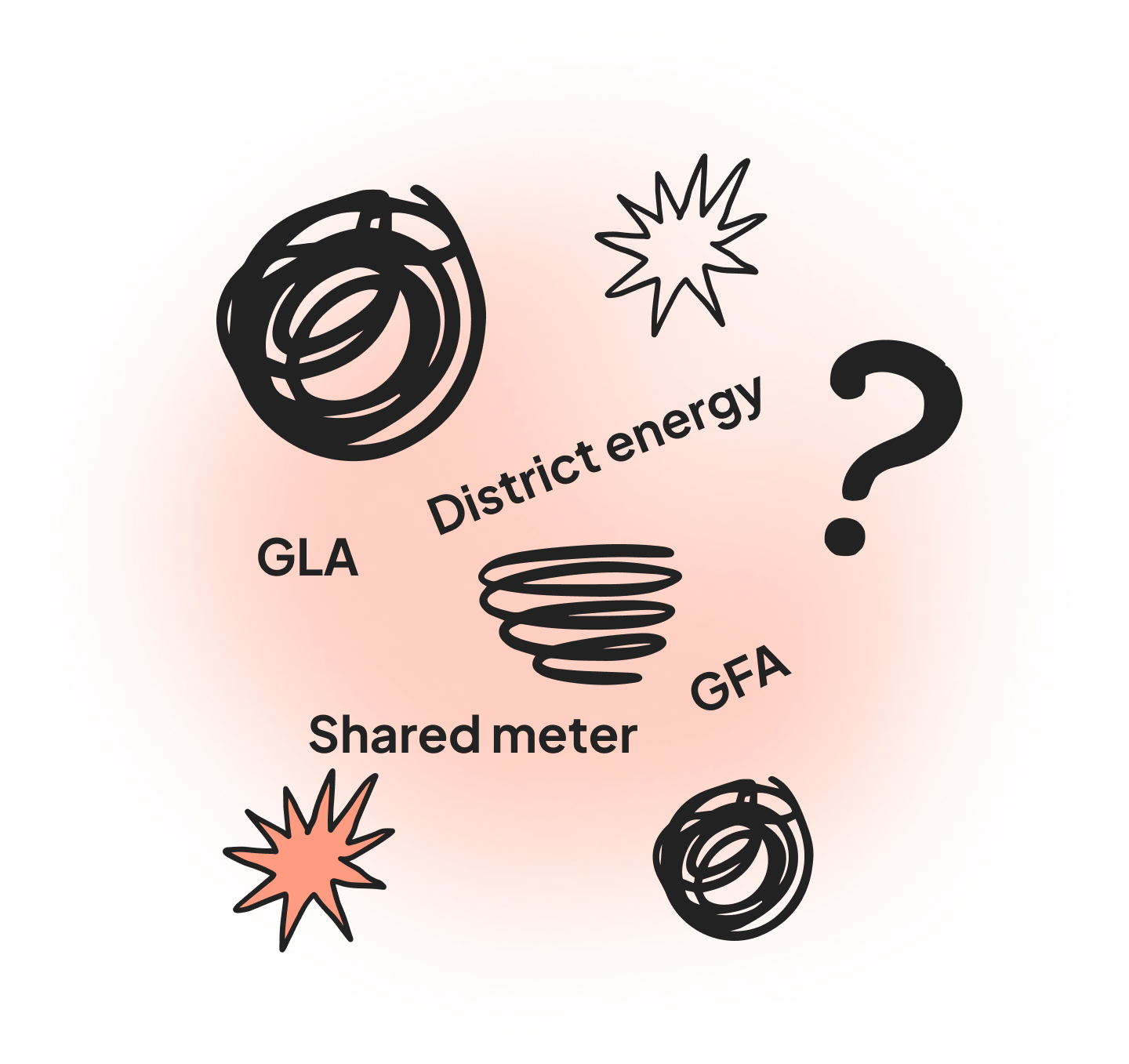
Technical jargon confused novice and experts predicted it will be challeging
Novice users felt overwhelmed by jargon like “district energy” and were unsure of inputs. Experts thought the reporting process could challenge non-experts, like property managers.
- Expertise level
spa
The solution
Overarching themes: the reporting tool must

Offer a clear visual affordance on Ul level
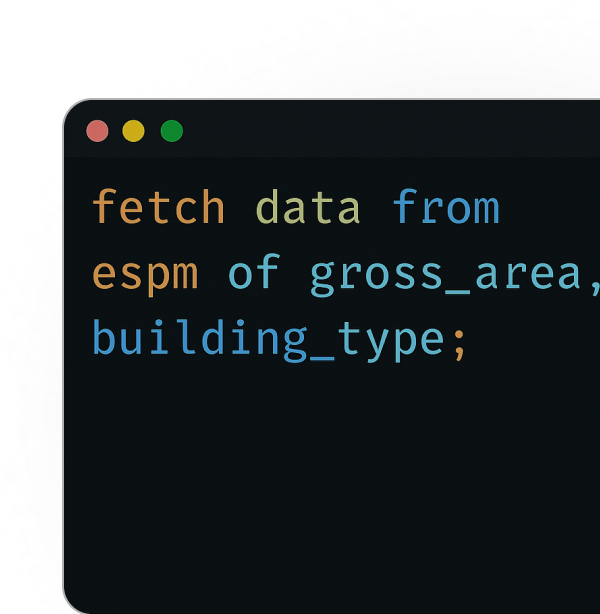
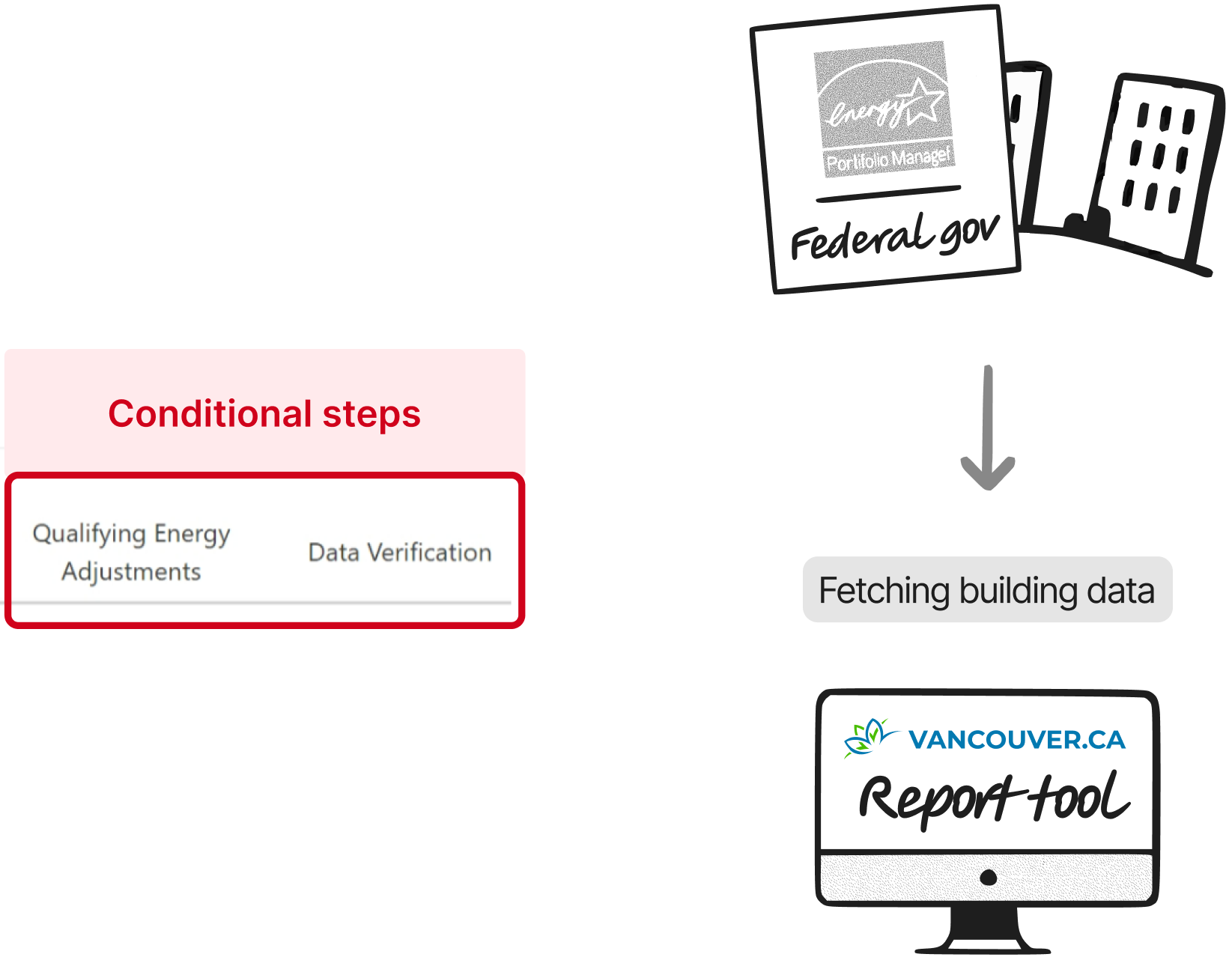
Reduce manual work by fetching data from federal government
Supports various experty levles

Clear visual affordance on Ul level
1/3

Problems
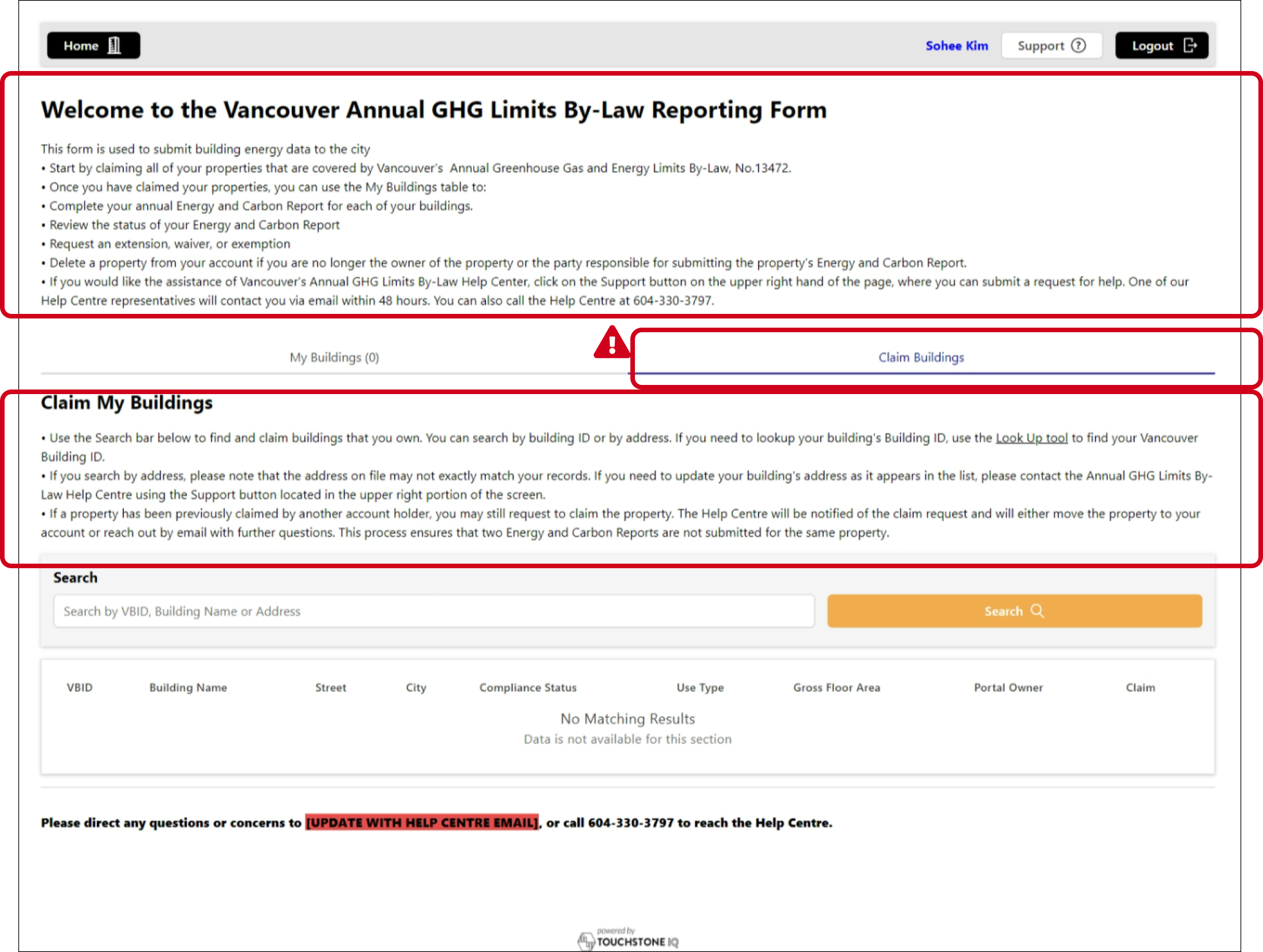
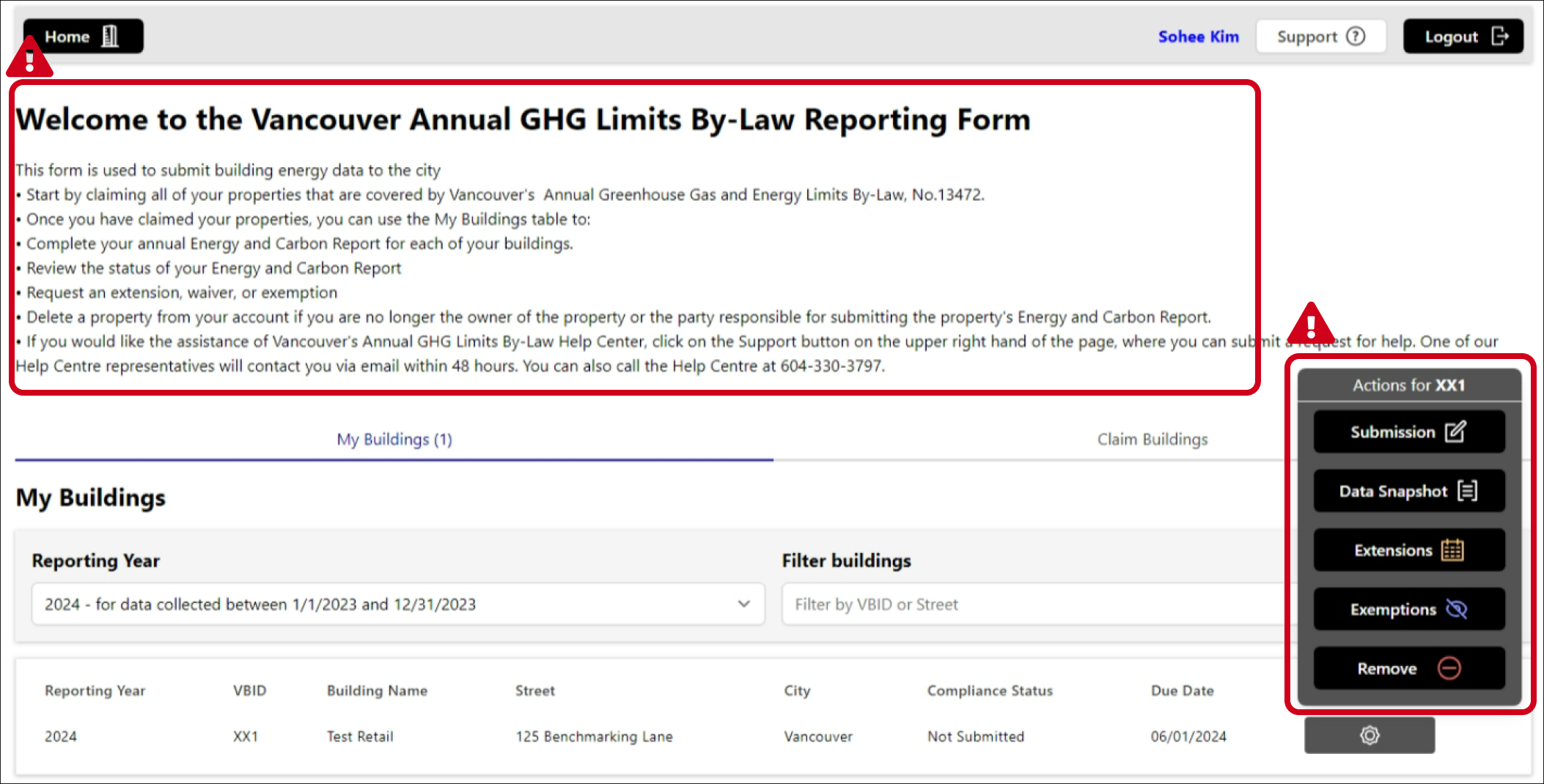
- This screen area is for static instructions, not primary components. The main goal "Submission" isn't visually prioritized and looks like secondary actions such as "Extensions" or "Revision."

Solutions
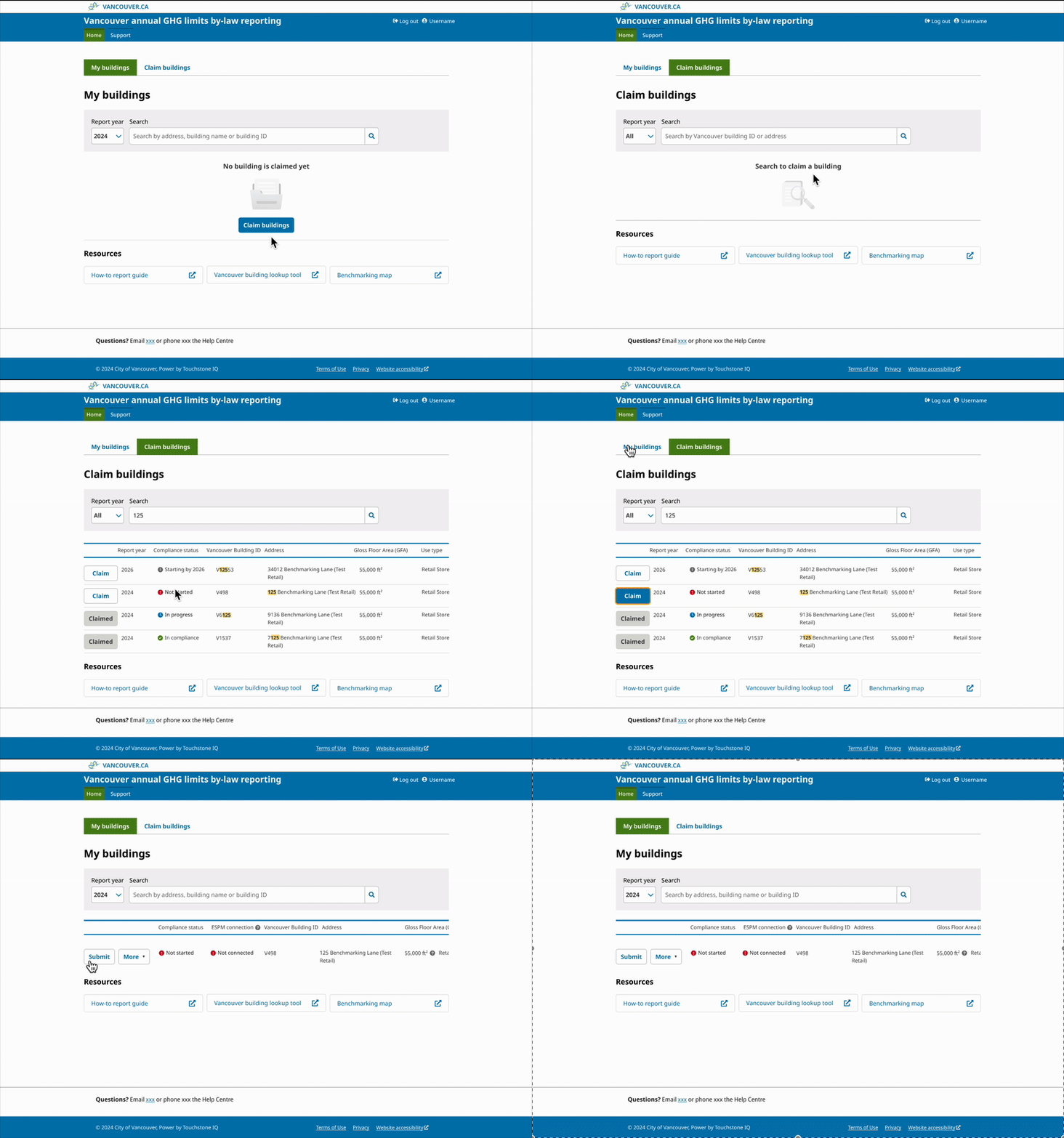
The screen now focuses on one core task with resources below. This reduces cognitive fatigue.
The task to start with (“Claim buildings”) is now visible and centred.
Reduce manual work by fetching data from federal government

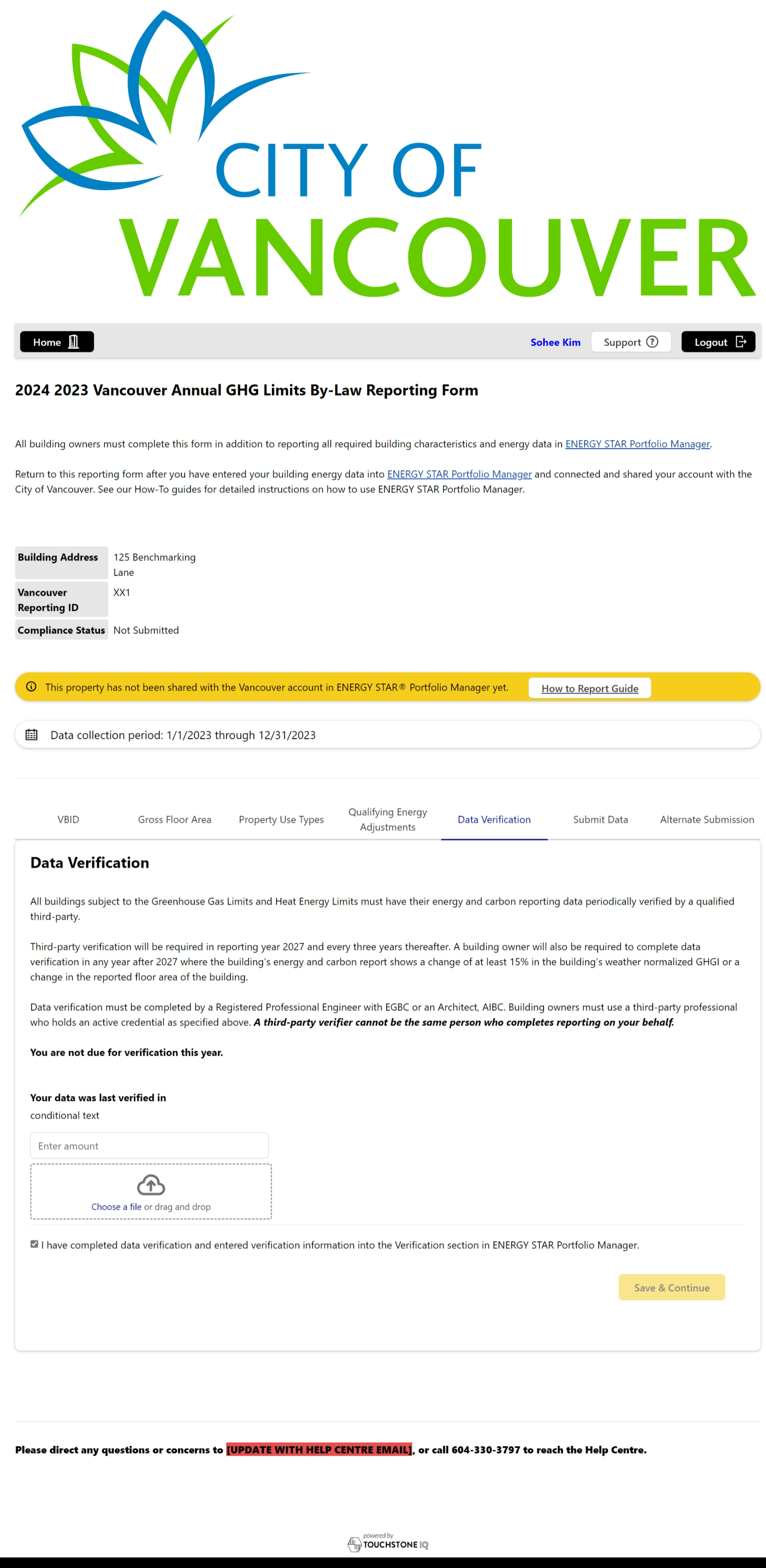
Problems

Solutions
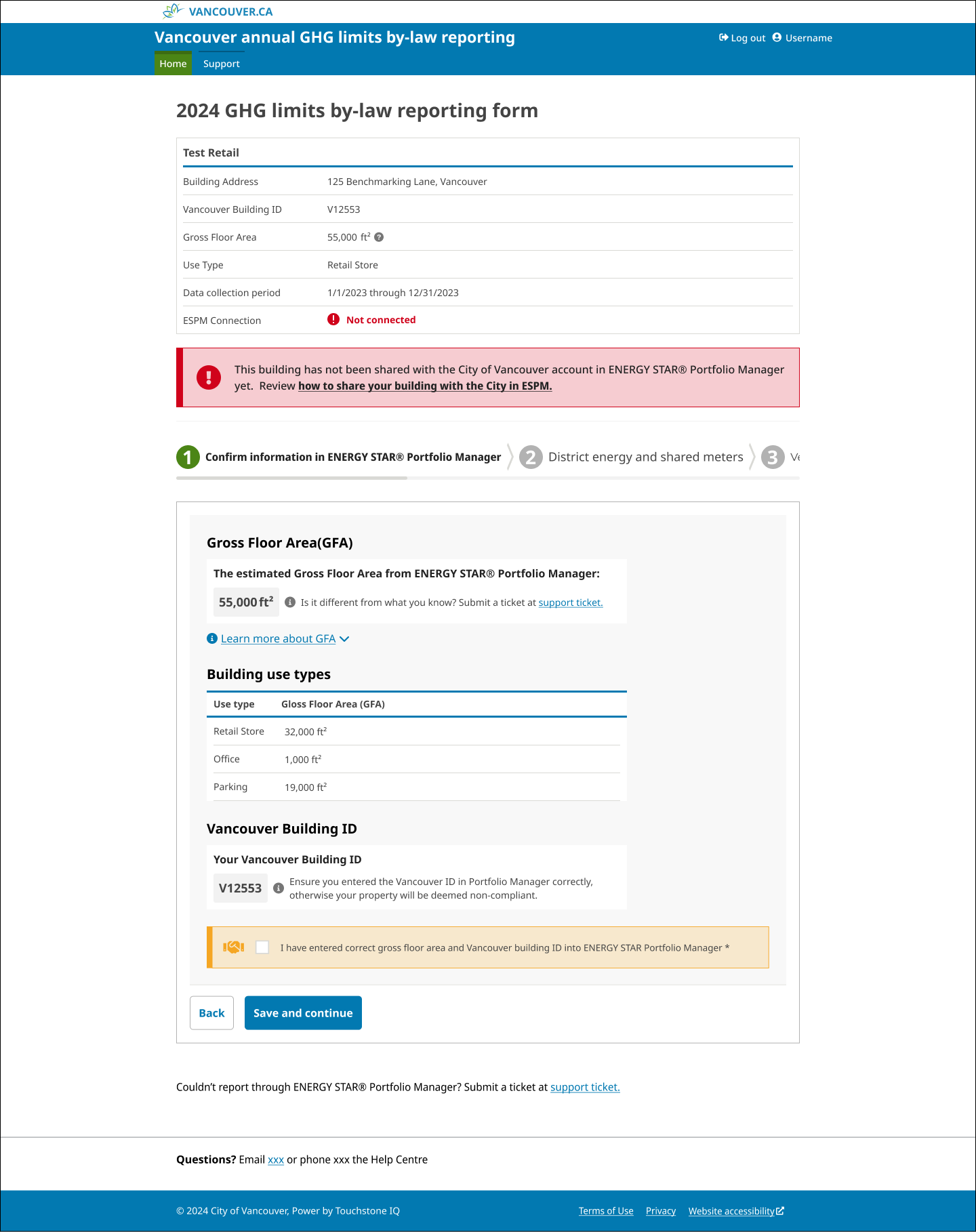
- Essential data is displayed and groupded based on the importance and information is grouped
Problems
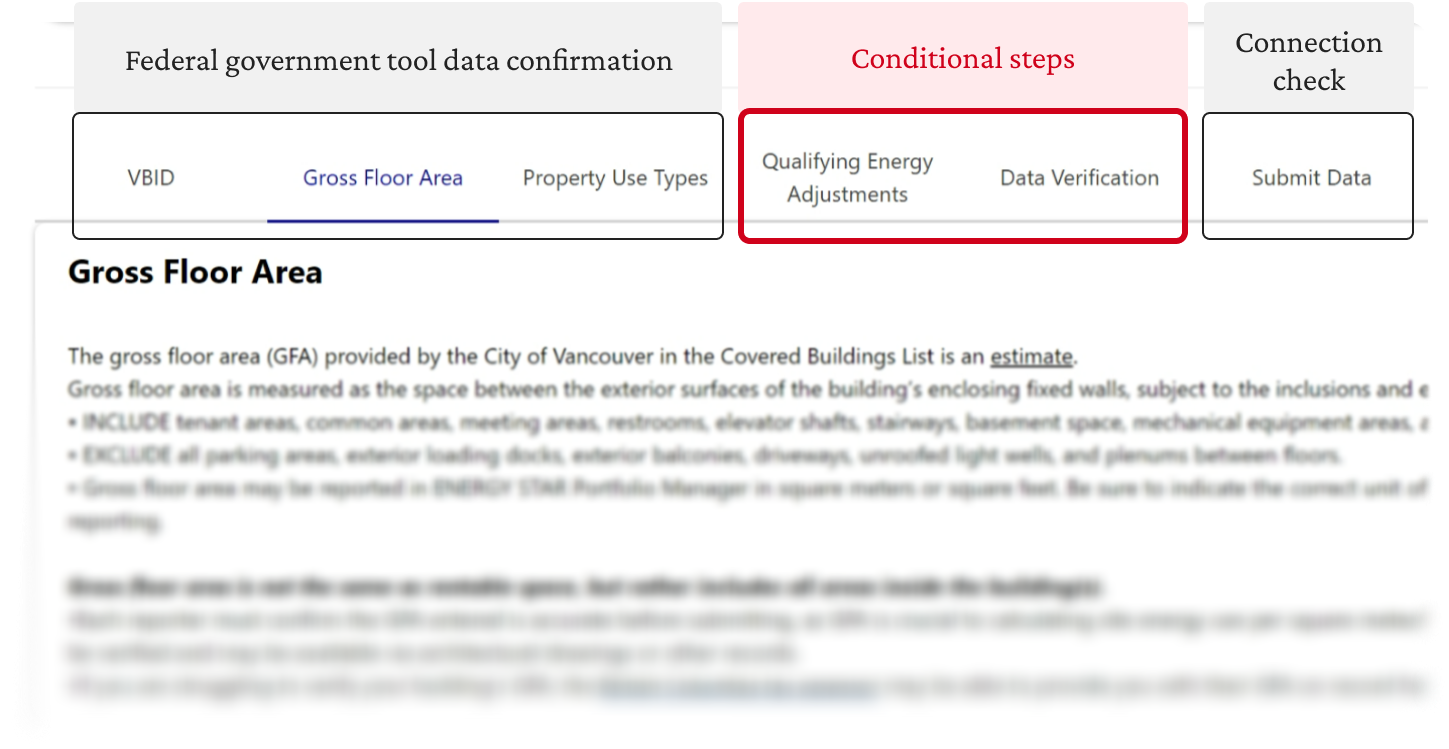
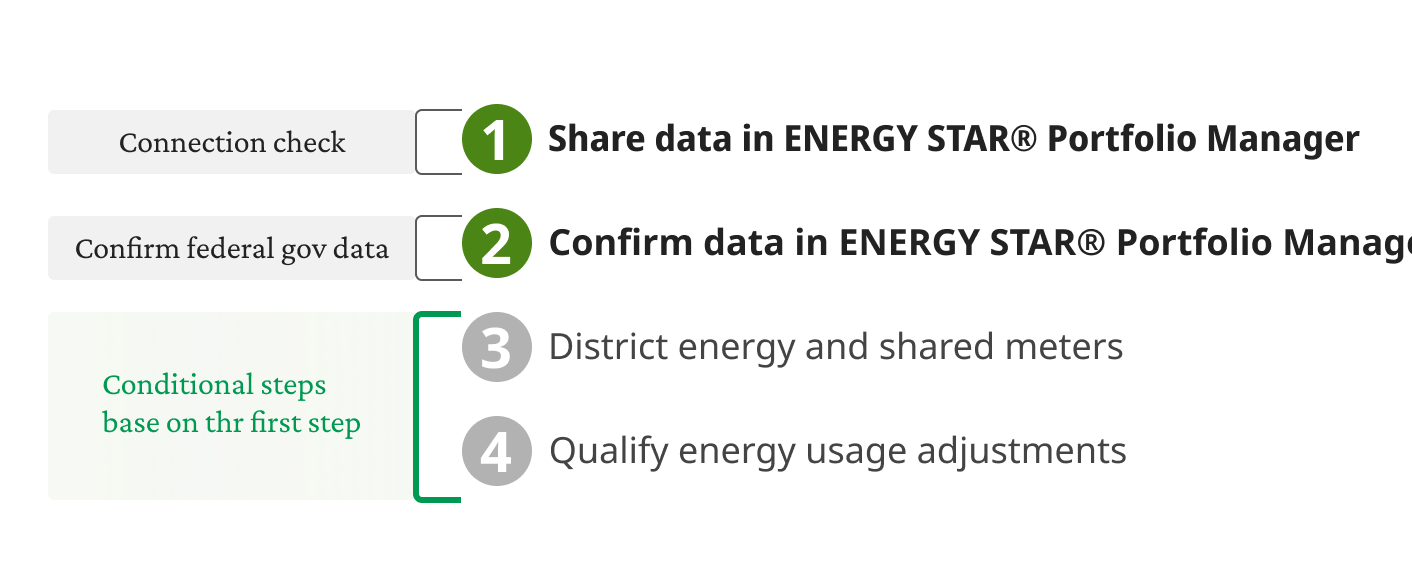
The system showed the same steps for all users, it was unnecessary for some. We didn’t have to.
Solutions
Reordering steps for users to face only necessary actions
Reordering steps for users to face only necessary actions
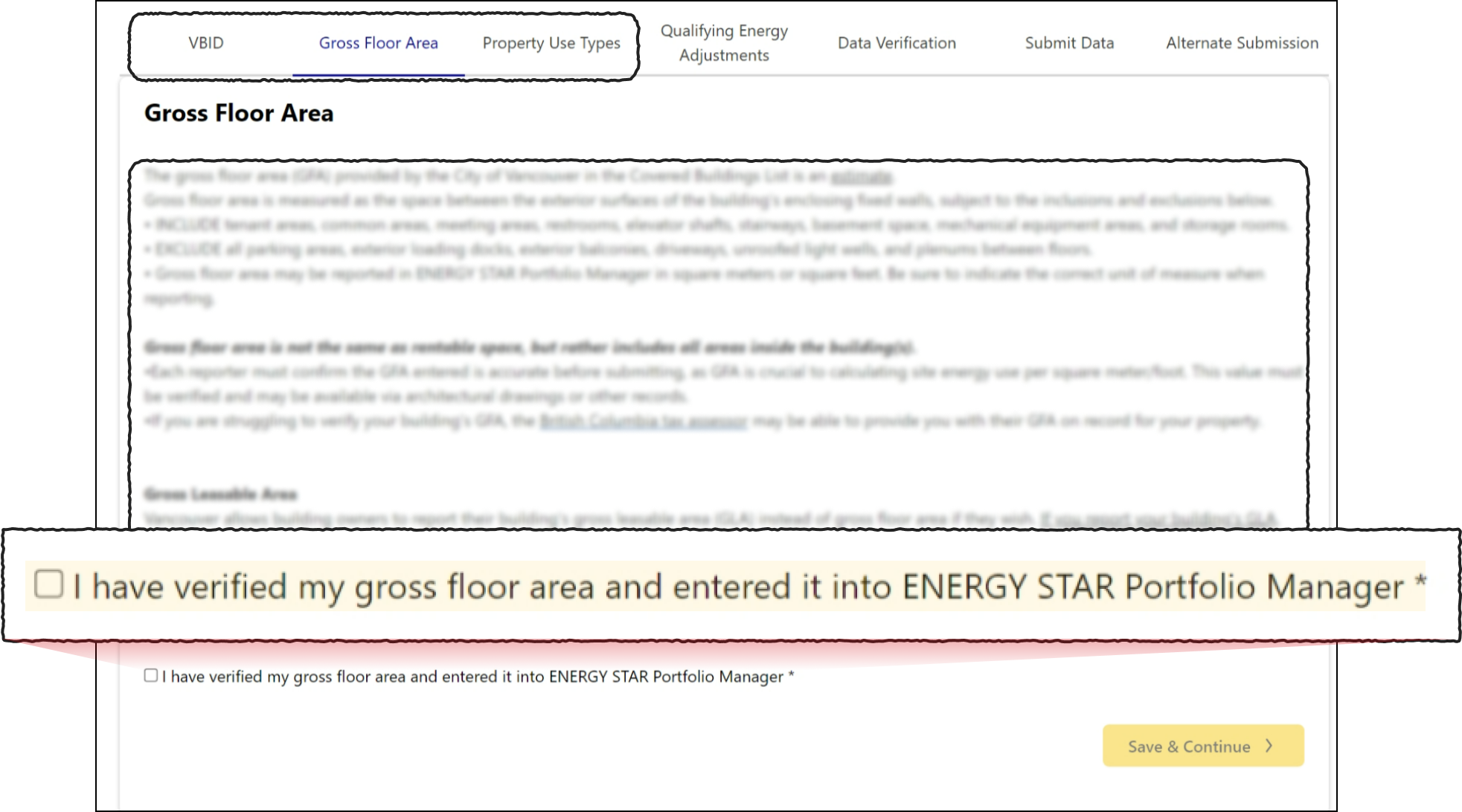
Problems
- Extensive and generic definitions
Solutions
It displays the user's actual data for easy verification
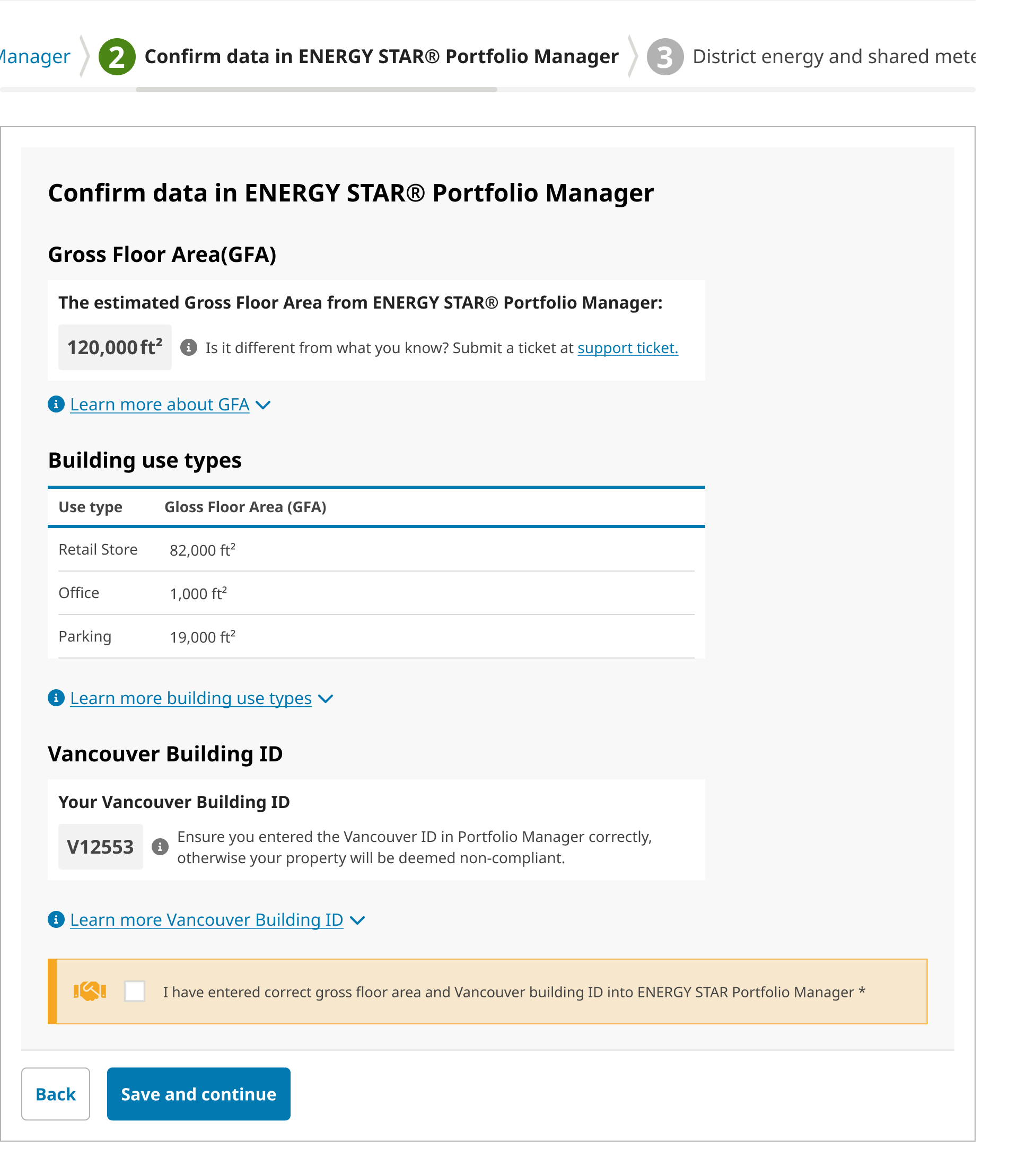
Replacing generic definitions with relevant user data, shifting users’s task from interpretation complex rules to simple verification
Problems
- The step2 and 3 were unnecessarily for some not qualified, this led time-consuming and confusion.
- The final placement of ESPM connection check, which is mandatory to submit the report, causes content oversight.
Solutions
Problems
Extensive forms challenged users to complete the task
Quotes from users:

“Reading this is a lot to take in at once. ”
“Ok, this is a lot to read. ”
“I’m a bit hung up about what these exceptions mean and if it affects if I need to file this year.”
“This is really challenging.”
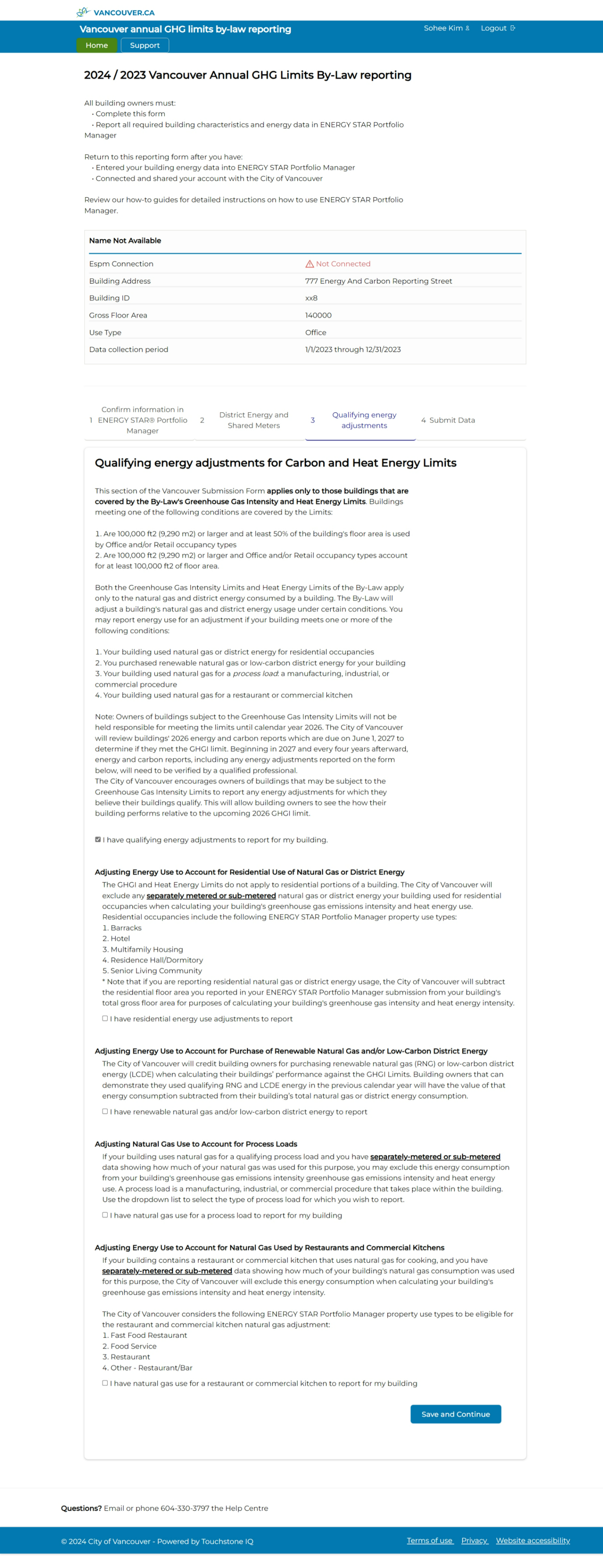
Solutions
Three conditions that filter who actually need to answer these questions
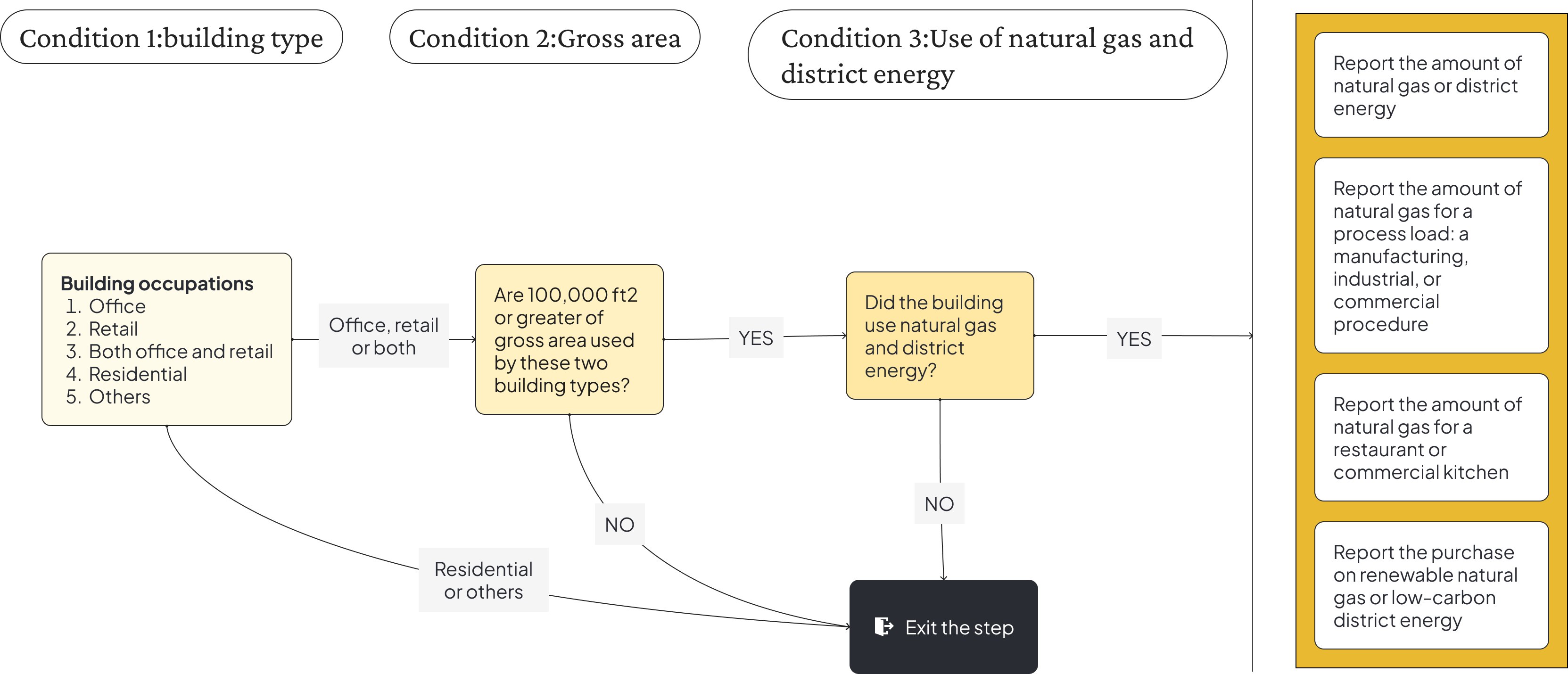
IBreak down long forms into multi-step flows and group related fields to avoid overwhelming users.

Solutions:
- Presenting information in smaller chunks allows users to focus on one piece at a time. This avoids wasting time on irrelevant steps, resulting in a faster, streamlined process.
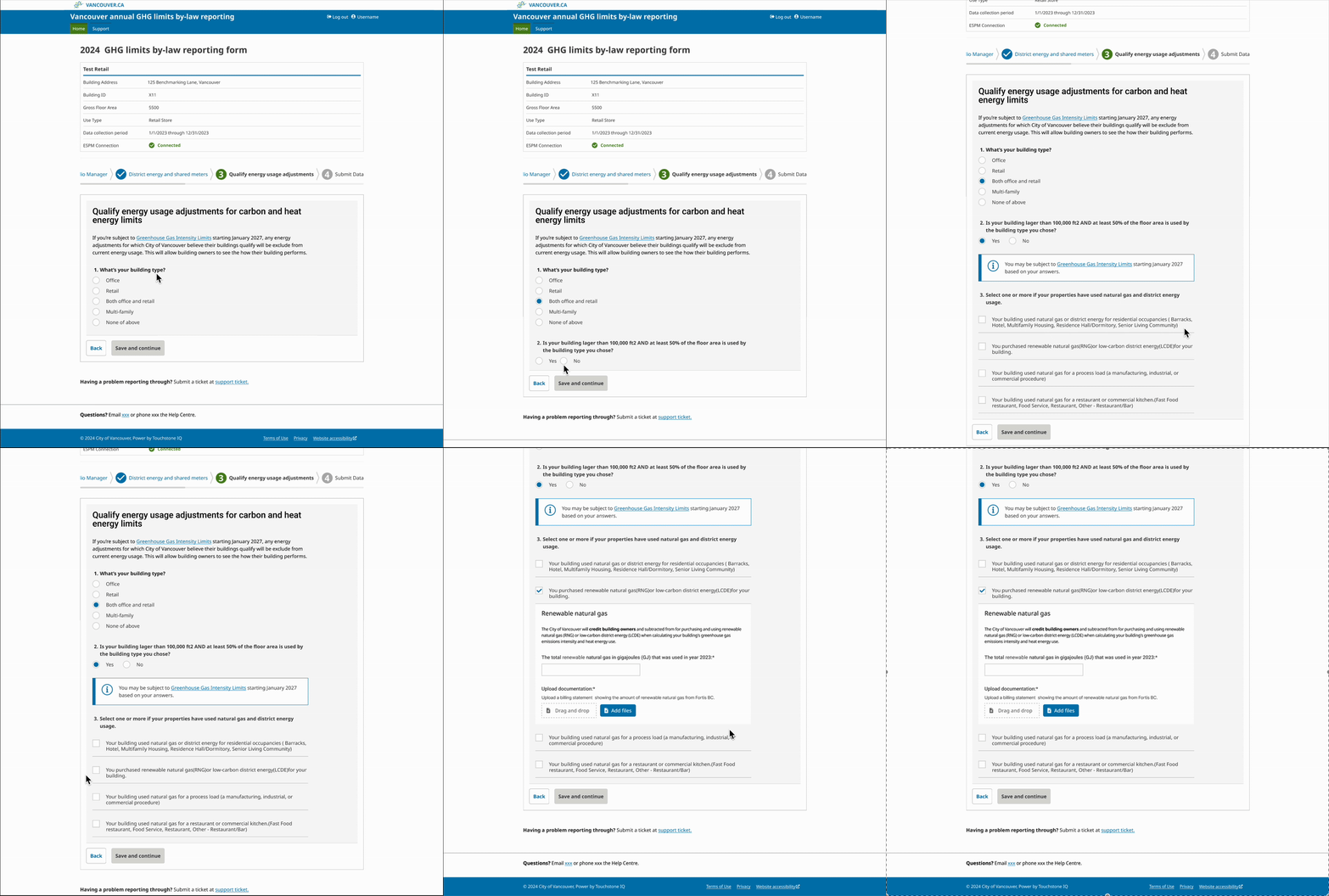
Support for users with different levels of expertise
3/3
Problems
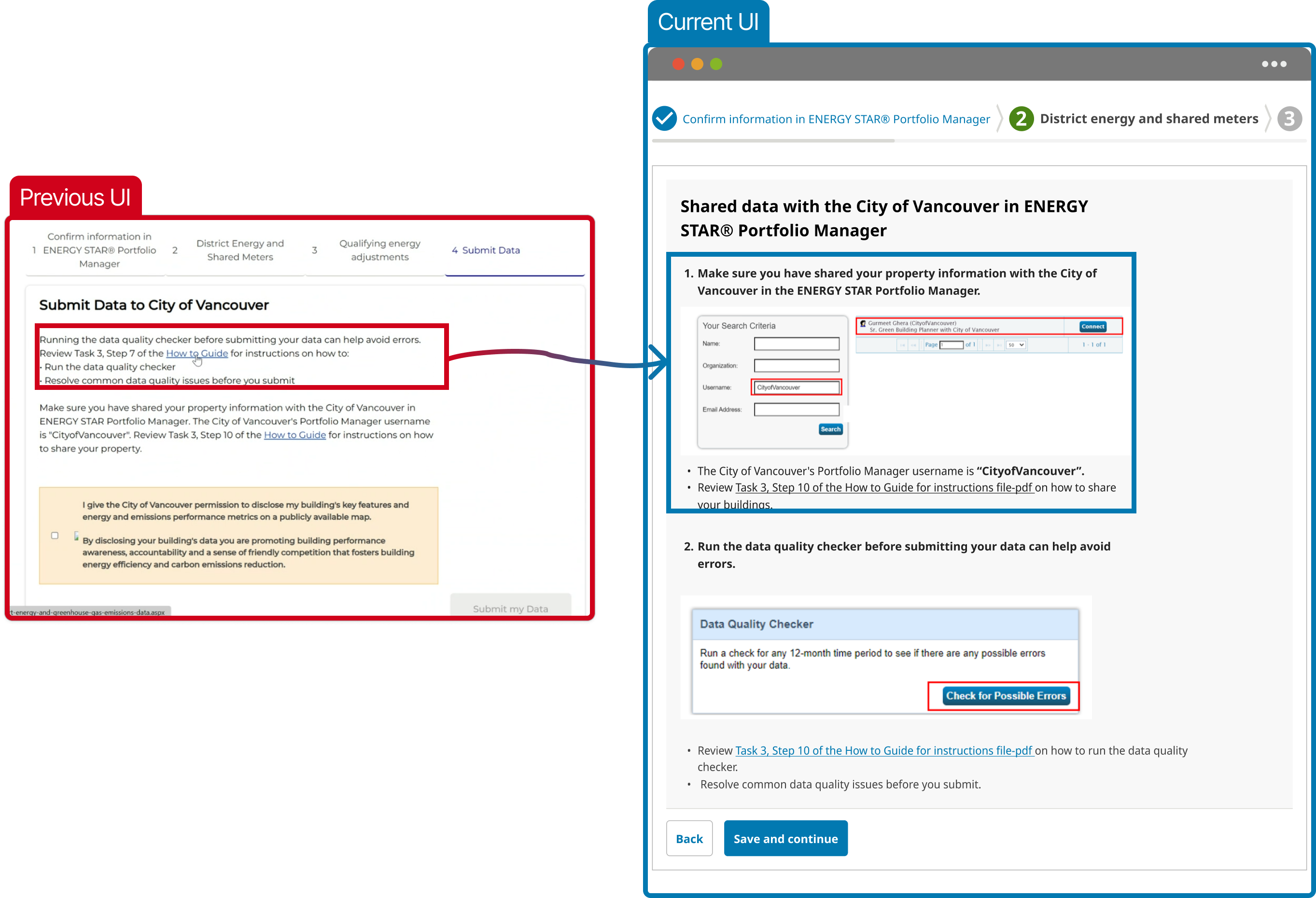
Users had to refer back to the guide PDFs or website for technical terms clarification.
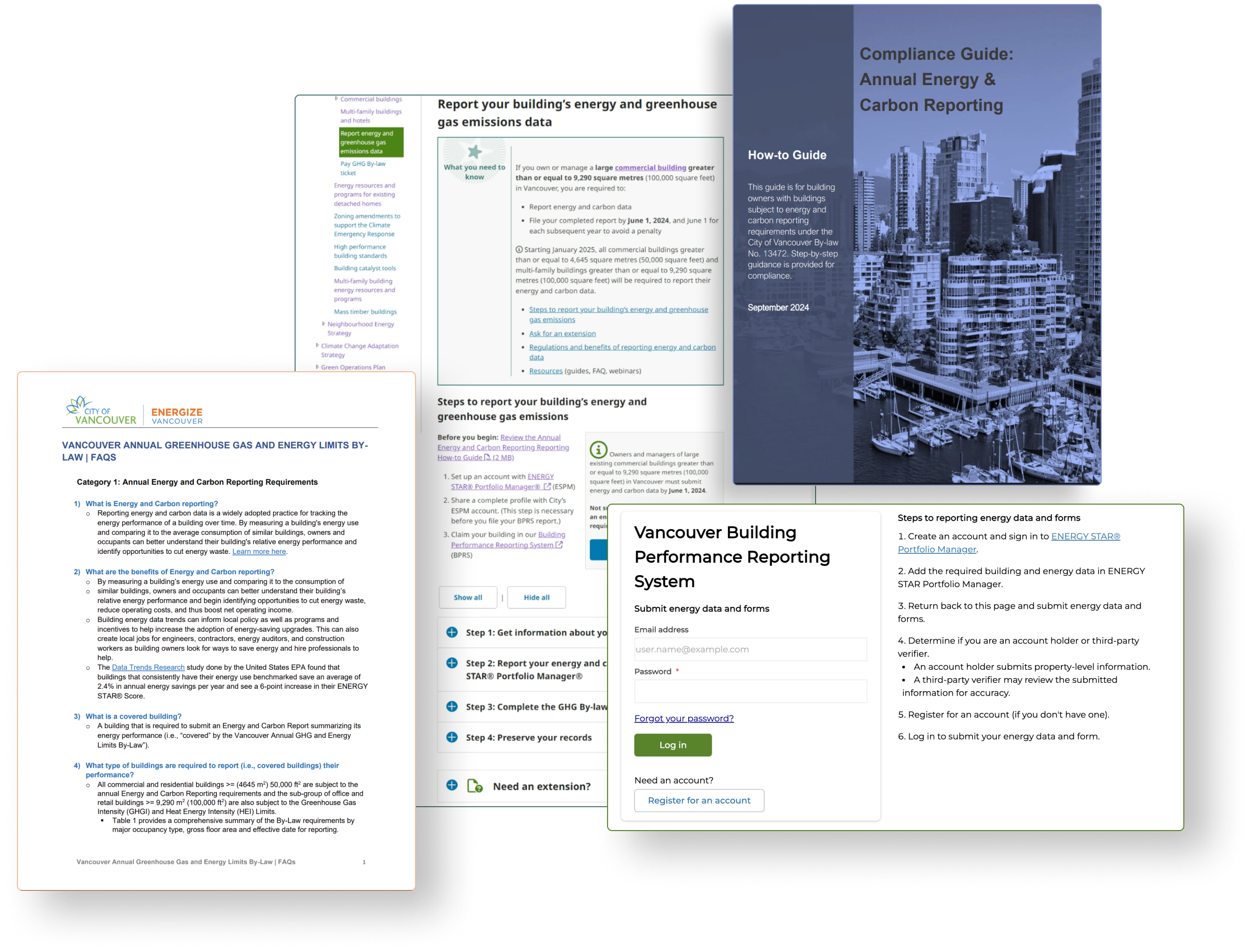
Vancouver.ca website, PDFs, and instruction in BPRS itself
Solutions
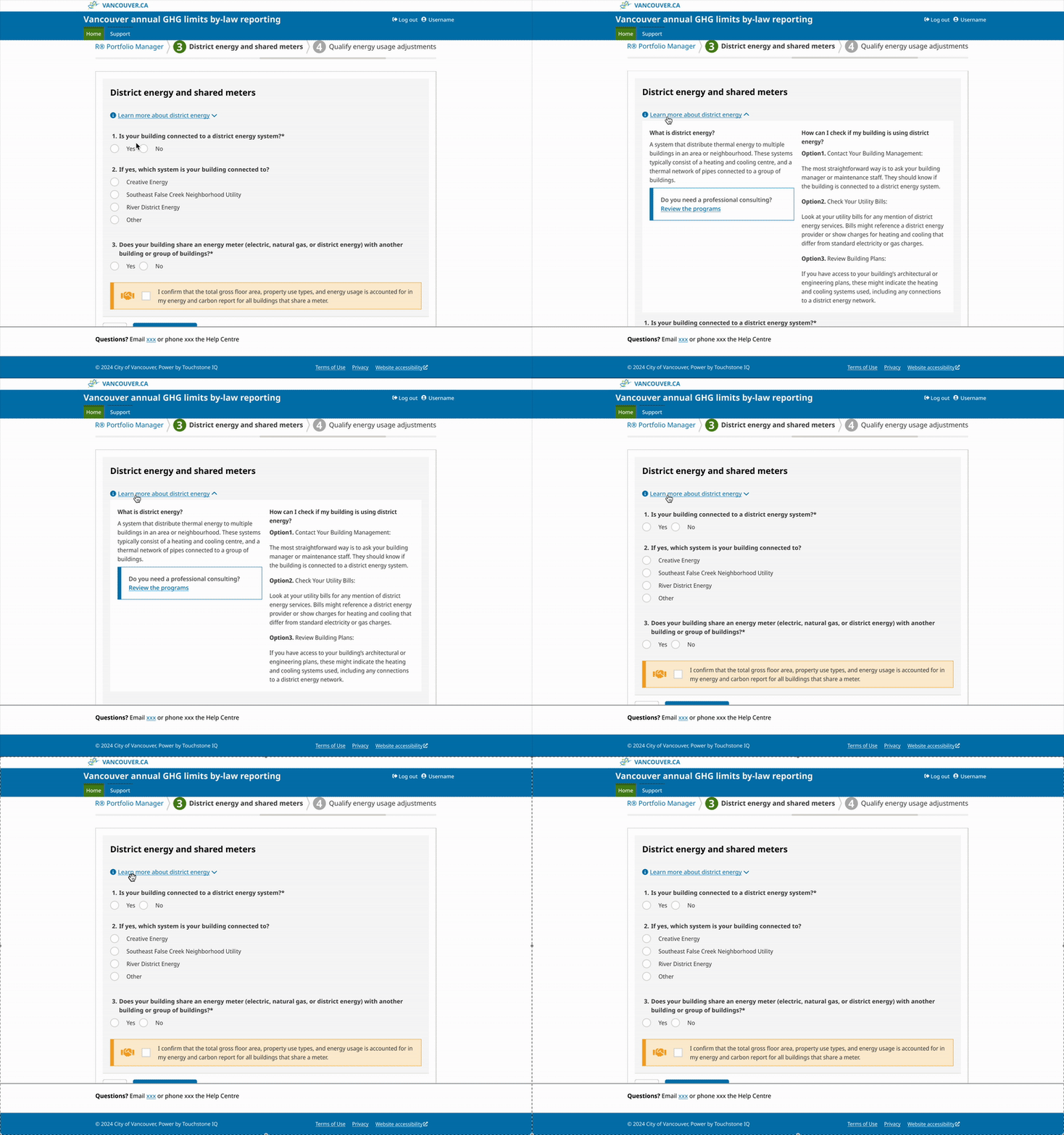
Included actual product screenshots on the most challenging step
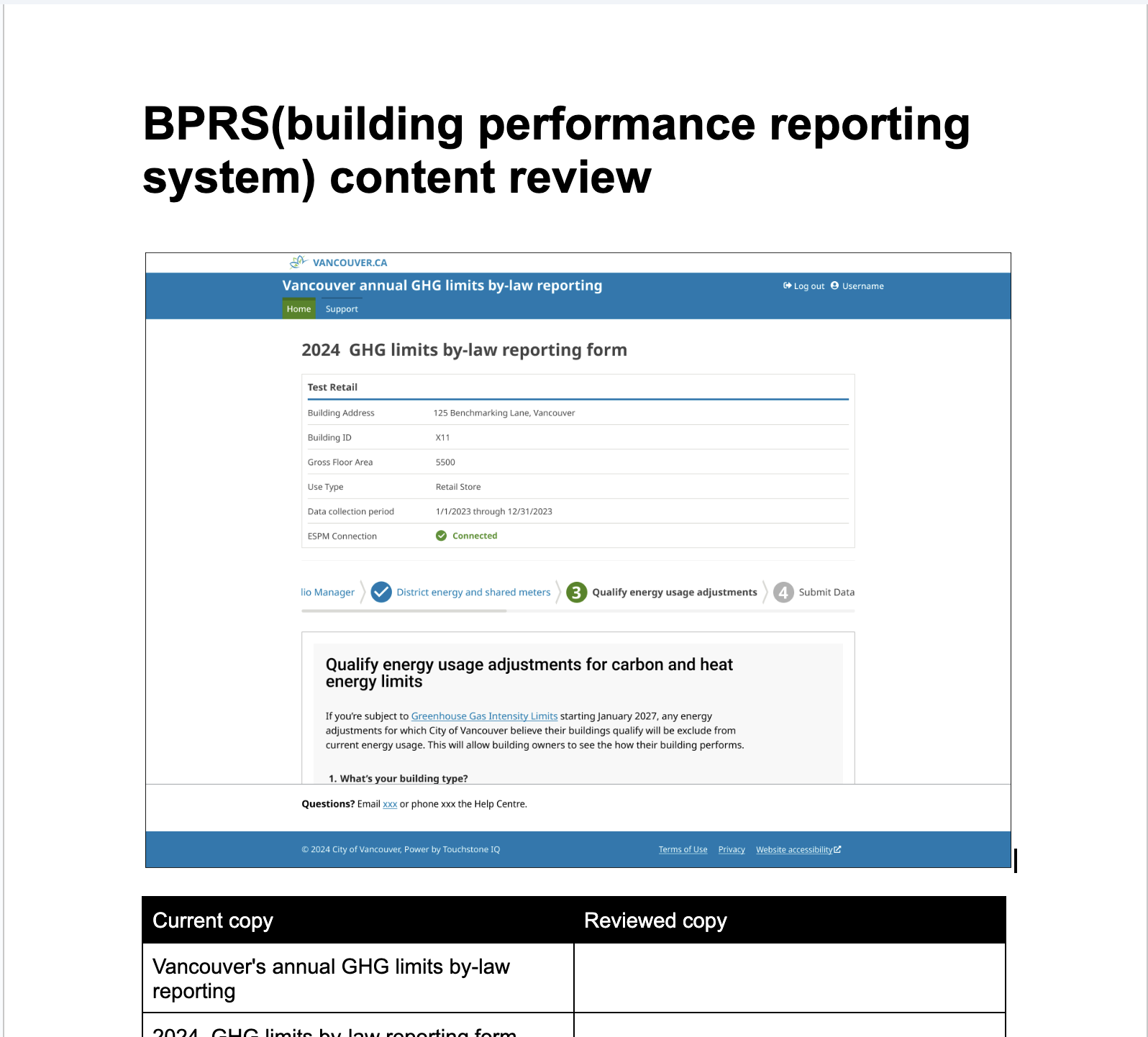
A example of content review word doc
circle
Outcomes
What impact did we make ?
📈
94%
94% of building owners submitted their reports in the first year.
⏱
65%
Support cost reduced by 65% compared to the previous month.
🥇
1st
The first in-house research done, set a new user-centric framework
Reflection
The interface is the first touchpoint with your customer, and it matters more than you think
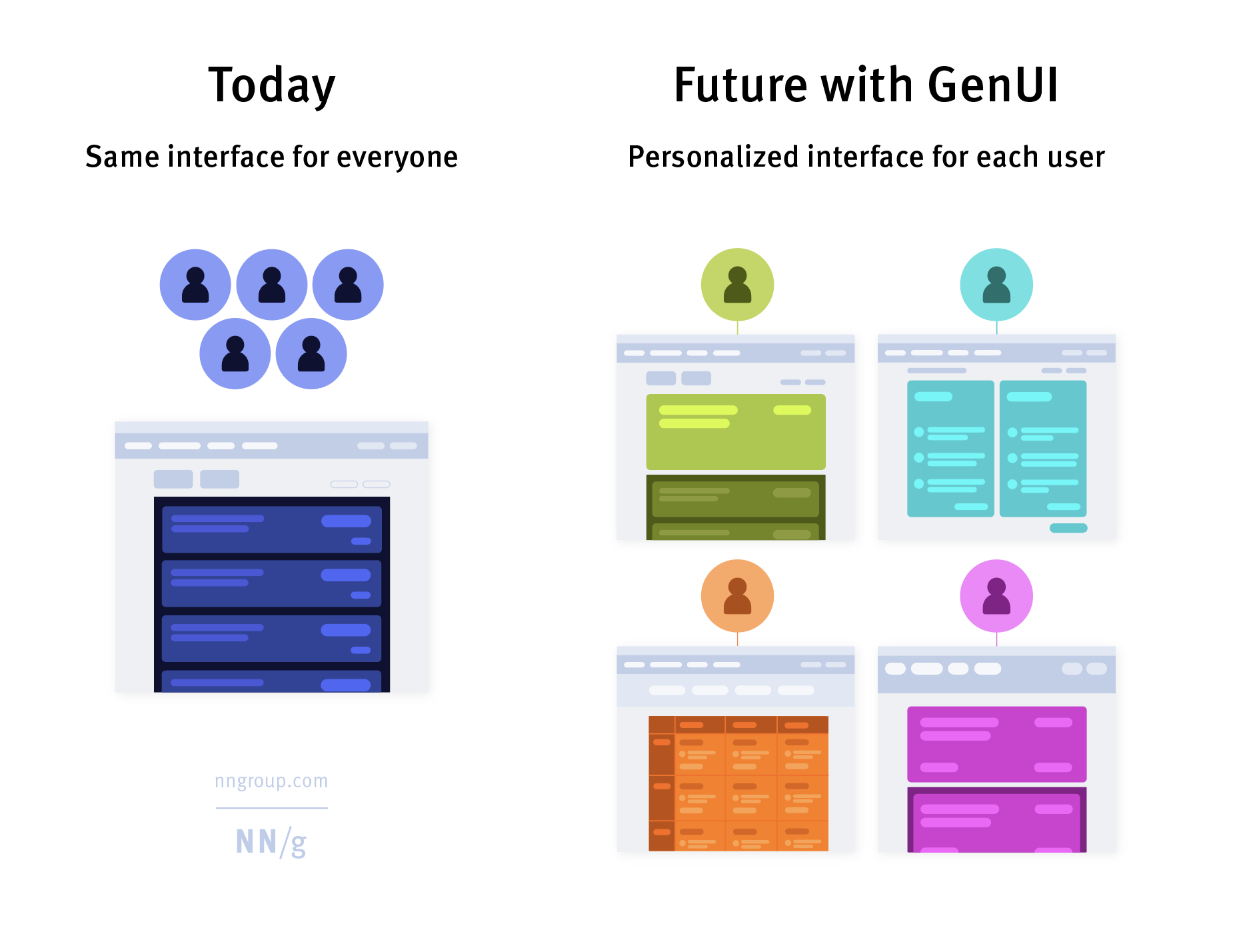
In an age where AI and automation dominate conversations, it’s easy to overlook the power of something as fundamental as the interface.
But here's the truth: the interface is your handshake with the user.
It's the first impression,
the first decision point,
the first moment someone decides,
"Do I trust this? Do I understand this? Can I do what I came here to do?"
This project demonstrates that users got overwhelmed — not because the regulation was too complex, but because the interface failed to support real human behavior.
By rethinking the interface — making it more intuitive, more self-explanatory — we didn’t just improve usability. We cut support costs, increased completion rates, and restored user trust.
Bring me back to top
Redesigning Vancouver’s carbon reporting system resulted in cutting support cost by 65%
Overview
New regulation introduced to building owners: Energize Vancouver. A part of the city's sustainability regulations to reduce the carbon pollution.
My role
- Lead UX Strategist
- Researcher
Teams
- Project manager
- Content strategist
- Third-party developers
- SME
Timeline
Nov 2023 - Feb 2024
(4 months)
Background
A sustainability regulation to keep the city greener and healthier by regulating carbon emission. Building owners are asked to report their carbon emission through online.
The business goal
A 90% compliance rate by the initial deadline.
The design goal
Make this complex green building regulation reporting process accessible for building owners.
circle
Outcomes
What impact did we make ?
📈
94%
Compliance rate by the initial deadline
⏱
65%
support cost reduction
🥇
1st
The first in-house research done, set a new user-centric framework
🥇
1st
The first in-house research done, set a new user-centric framework and present it in the digital dept
tools
Design process
Behind the scenes of the redesign
fire
The trigger
What signalled the problem
vial
The approach
How we investigated
lightbulb
The insights
What we discovered
spa
The solution
Themes & representative designs
Take me to the solution
We decided to improve the city’s reporting process ,
here is why:
quote-left
Background
6 steps are involved in the new regulation of carbon emission report
We expected that if the high volume of support calls persists, it will result in a more significant cost impact in the future
~ 212

~ 1,527

x 7.6 times

The approach
Then we chose the right research to identify what apects about
We conducted and utilized:
- Contextual inquiries (Qualitative)
- Heuristic evaluation (Expert analysis)
- CX data (Quantitative metric)
Then we chose the right research to identify what apects about
Engaged with 5 users across various roles and expertise levels.
- 3 users were experts, well-versed in their domains and familiar with similar tools.
- 2 users were novices, lacking industry knowledge and experience with these tools.
One-on-one moderated sessions remotely, lasting an hour per session. Observed their workflows and noted moments of hesitation.
Expert
ESRG Program
coordinator
Expert
Building energy system initiative
Expert
Director of energy and commissioning
Novice
Energy analyst
Novice
Administrative
support
The insight
False assumption
User groups
Guidance
Expertise level
- User groups
72% of users are third party consultants, not building owners
After inquiries, we wondered if it was coincidence that none of our recruits were building owners. They were all third-party reporters or managers. Our CX data showed that 72% of users are third-party, not actual building owners.
One of the step in registration on BPRS
They are dealing with multiple buildings and have little access to the building data
Building owners delegate tasks to consultants who manage properties. They lack the same data access as building owners. So they utilized external resources (e.g., old architectural drawings, building data spreadsheets made themselves, Google Maps, Brightly)
External resources (e.g., old architectural drawings, building data spreadsheets
made themselves, Google Maps, Brightly)
- Guidance
Static instructions, website, PDFs and FAQs, didn’t help users move forward, but overwhelmed users
- Expertise level
Technical jargon confused novice and experts predicted it will be challenging
Novice users felt overwhelmed by jargon like “district energy” and were unsure of inputs. Experts thought the reporting process could challenge non-experts, like property managers.
spa
The solution
Overarching themes: the reporting tool must
Offer a clear visual affordance on Ul level
Reduce manual work by fetching data from federal government
Supports various experty levles
Clear visual affordance on Ul level
1/3
Problems
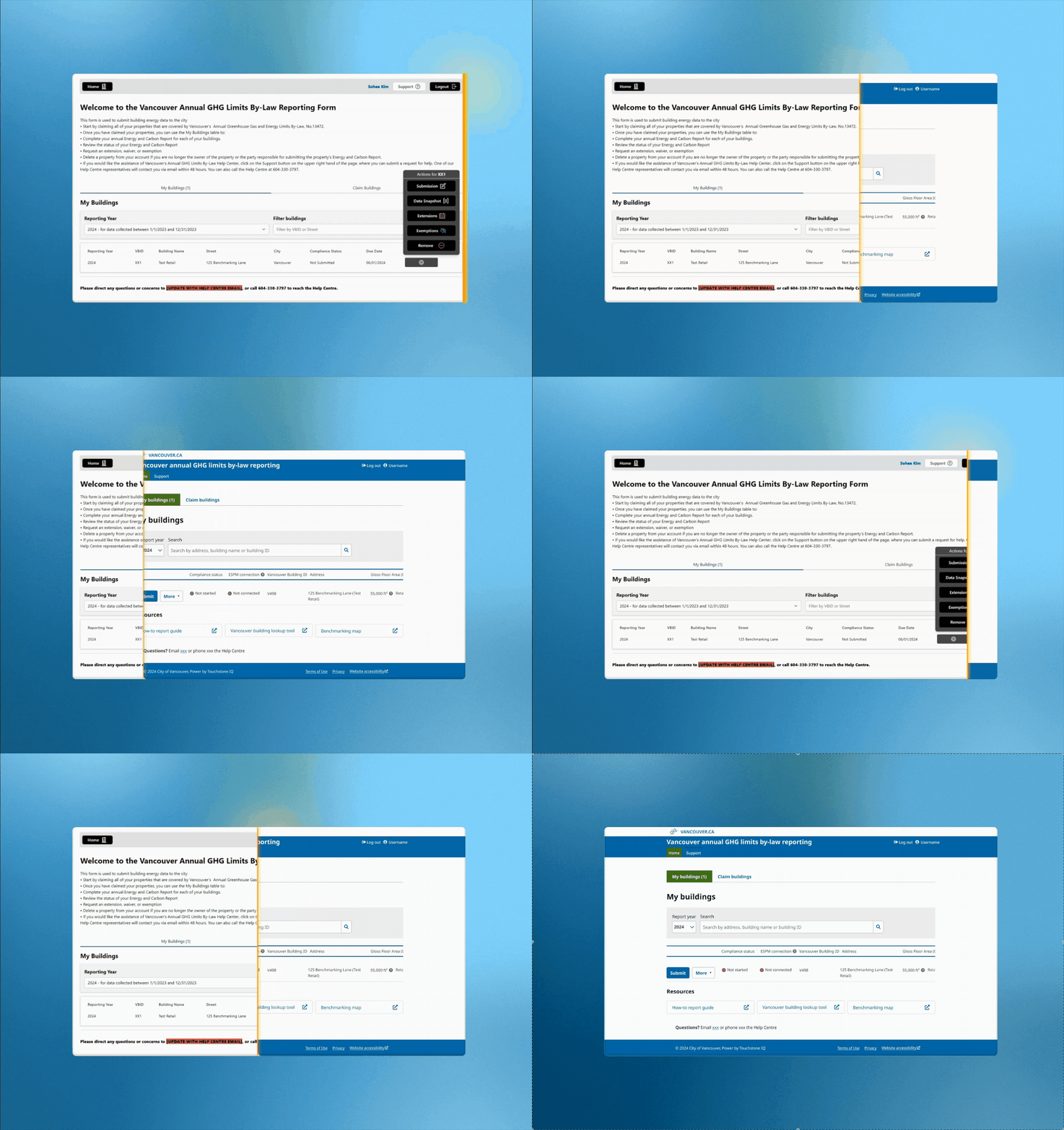
- This screen area is for static instructions, not primary components. The main goal "Submission" isn't visually prioritized and looks like secondary actions such as "Extensions" or "Revision."
Solutions
The screen now focuses on one core task with resources below. This reduces cognitive fatigue.
The task to start with (“Claim buildings”) is now visible and centred.
Reduce manual work by fetching data from federal government
2/3
Problems

Solutions
- Essential data is displayed and groupded based on the importance and information is grouped
Problems
The system showed the same steps for all users, it was unnecessary for some. We didn’t have to.
Solutions
Reordering steps for users to face only necessary actions
Reordering steps for users to face only necessary actions
Problems
- Extensive and generic definitions
Solutions
It displays the user's actual data for easy verification
Problems
Extensive forms challenged users to complete the task
Quotes from users:
“Reading this is a lot to take in at once. ”
“Ok, this is a lot to read. ”
“I’m a bit hung up about what these exceptions mean and if it affects if I need to file this year.”
“This is really challenging.”
Solutions
Three conditions that filter who actually need to answer these questions
IBreak down long forms into multi-step flows and group related fields to avoid overwhelming users.
Solutions:
- Presenting information in smaller chunks allows users to focus on one piece at a time. This avoids wasting time on irrelevant steps, resulting in a faster, streamlined process.
Support for users with different levels of expertise
3/3
Problems
Users had to refer back to the guide PDFs or website for technical terms clarification.
Solutions
Present technical terms for accuracy by default, allowing users to access detailed explanations as needed.
Included actual product screenshots on the most challenging step
I collaborated with a content strategist to audit interface copy aligned with plain language guidelines.
A example of content review word doc
circle
Outcomes
What impact did we make ?
📈
94%
94% of building owners submitted their reports in the first year.
⏱
65%
Support cost reduced by 65% compared to the previous month.
🥇
1st
The first in-house research done, set a new user-centric framework
Reflection
The interface is the first touchpoint with your customer, and it matters more than you think
In an age where AI and automation dominate conversations, it’s easy to overlook the power of something as fundamental as the interface.
But here's the truth: the interface is your handshake with the user.
It's the first impression,
the first decision point,
the first moment someone decides,
"Do I trust this? Do I understand this? Can I do what I came here to do?"
This project demonstrates that users got overwhelmed — not because the regulation was too complex, but because the interface failed to support real human behavior.
By rethinking the interface — making it more intuitive, more self-explanatory — we didn’t just improve usability. We cut support costs, increased completion rates, and restored user trust.
Bring me back to top
Redesigning Vancouver’s carbon reporting system resulted in cutting support cost by 65%
Overview
New regulation introduced to building owners: Energize Vancouver, a part of the city's sustainability regulations to reduce the carbon pollution.
My role
- Lead UX Strategist
- Researcher
Teams
- Project manager
- Content strategist
- Third-party developers
- SME
Timeline
Nov 2023 - Feb 2024
(4 months)
Background
A sustainability regulation to keep the city greener and healthier by regulating carbon emission. Building owners are asked to report their carbon emission through online.
The business goal
A 90% compliance rate by the initial deadline.
The design goal
Make this complex green building regulation reporting process accessible for building owners.
chart-pie
Outcomes
What impact did we make?
📈
94%
Compliance rate by the initial deadline
⏱
65%
support cost reduction
🥇
1st
The first in-house research done, set a new user-centric framework
🥇
1st
The first in-house research done, set a new user-centric framework and present it in the digital dept
tools
Design process
Behind the scenes of the redesign
fire
The trigger
What signalled the problem
vial
The approach
How we investigated
lightbulb
The insights
What we discovered
spa
The solution
Themes & representative designs
Take me to the solution
We decided to improve the city’s reporting process ,
here is why:
quote-left
Background
A surge in support calls revealed something was off about the City’s reporting tool
We expected that if the high volume of support calls persists, it will result in a more significant cost impact in the future
~ 212

~ 1,527

x 7.6 times

The approach
Then we chose the right research to identify what aspects are not supporting users
We conducted and utilized:
- Contextual inquiries (Qualitative)
- Heuristic evaluation (Expert analysis)
- CX data (Quantitative metric)
I conducted contextual inquiries with 5 users of varied roles and expertise levels
Engaged with 5 users across various roles and expertise levels.
- 3 users were experts, well-versed in their domains and familiar with similar tools.
- 2 users were novices, lacking industry knowledge and experience with these tools.
One-on-one moderated sessions remotely, lasting an hour per session. Observed their workflows and noted moments of hesitation.
Expert
ESRG Program
coordinator
Expert
Building energy system initiative
Expert
Director of energy and commissioning
Novice
Energy analyst
Novice
Administrative
support
The insight
I uncovered 3 incorrect assumptions from
contextual inquiries & CX data
User groups
Guidance
Expertise level
- User groups
72% of users are third party consultants, not building owners
After inquiries, we wondered if it was coincidence that none of our recruits were building owners. They were all third-party reporters or managers. Our CX data showed that 72% of users are third-party, not actual building owners.
One of the step in registration on BPRS
External resources
They are dealing with multiple buildings and have little access to the building data
Building owners delegate tasks to consultants who manage properties. They lack the same data access as building owners. So they utilized external resources (e.g., old architectural drawings, building data spreadsheets made themselves, Google Maps, Brightly)
- Guidance
Static instructions, website, PDFs and FAQs, didn’t help users move forward, but overwhelmed users
- Expertise level
Technical jargon confused novice users and even experts
Novice users felt overwhelmed by jargon like “district energy” and were unsure of inputs. Experts thought the reporting process could challenge non-experts, like property managers.
spa
The solution
Overarching themes: the reporting tool must
Offer a clear visual affordance on Ul level
Reduce manual work by fetching data from federal government
Support users with different levels of expertise
Clear visual affordance on Ul level
1/3
Problems
Home screen: dense with instructional text and it blocks the actual task.
Home screen: The main task ‘Submission’ isn’t prioritized and looks like secondary actions.

Solutions
The screen now focuses on one core task with resources below. This reduces cognitive fatigue.
The task to start with (“Claim buildings”) is now visible and centred.
Reduce manual work by fetching data from federal government
2/3
Problems
- Essential data is not displayed and information is dispersed throughout the parent interfaces, making it difficult for users to find what they need.
Solutions
- Automatically retrieve and display building-related data (e.g., Gross Floor Area, use type, building ID) reducing the manual checking burden on users.
Problems
The system showed the same steps for all users, it was unnecessary for some. We didn’t have to.
Solutions
I looked at what data we are fetching from federal government and determined that we can utilize to conditionally display certain steps.
Now, it displays conditionally certain steps, so users face only necessary steps
Problems
A gap between the users' main task and content in the steps: verifying data vs broad definitions
Solutions
It displays the user's actual data for easy verification
Problems
Extensive forms challenged users to complete the task
Quotes from users:
“Reading this is a lot to take in at once. ”
“Ok, this is a lot to read. ”
“I’m a bit hung up about what these exceptions mean and if it affects if I need to file this year.”
“This is really challenging.”
Solutions
Three conditions that filter who actually need to answer these questions
I broke down long forms into multi-step flows and group related fields to avoid overwhelming users.
Solutions:
- Presenting information in smaller chunks allows users to focus on one piece at a time. This avoids wasting time on irrelevant steps, resulting in a faster, streamlined process.
Support for users with different levels of expertise
3/3
Problems
Users had to refer back to the guide PDFs or website for technical terms clarification.
Vancouver.ca website, PDFs, and instruction in BPRS itself
Solutions
Present technical terms for accuracy by default, allowing users to access detailed explanations as needed.
Included actual product screenshots on the most challenging step
I collaborated with a content strategist to audit interface copy aligned with plain language guidelines.
A example of content review word doc
chart-pie
Outcomes
What impact did we make?
📈
94%
94% of building owners submitted their reports in the first year.
⏱
65%
Support cost reduced by 65% compared to the previous month.
🥇
1st
The first in-house research done, set a new user-centric framework
Reflection
The interface is the first touchpoint with your customer, and it matters more than you think
In an age where AI and automation dominate conversations, it’s easy to overlook the power of something as fundamental as the interface.
But here's the truth: the interface is your handshake with the user.
It's the first impression,
the first decision point,
the first moment someone decides,
"Do I trust this? Do I understand this? Can I do what I came here to do?"
This project demonstrates that users got overwhelmed — not because the regulation was too complex, but because the interface failed to support real human behavior.
By rethinking the interface — making it more intuitive, more self-explanatory — we didn’t just improve usability. We cut support costs, increased completion rates, and restored user trust.
Bring me back to top